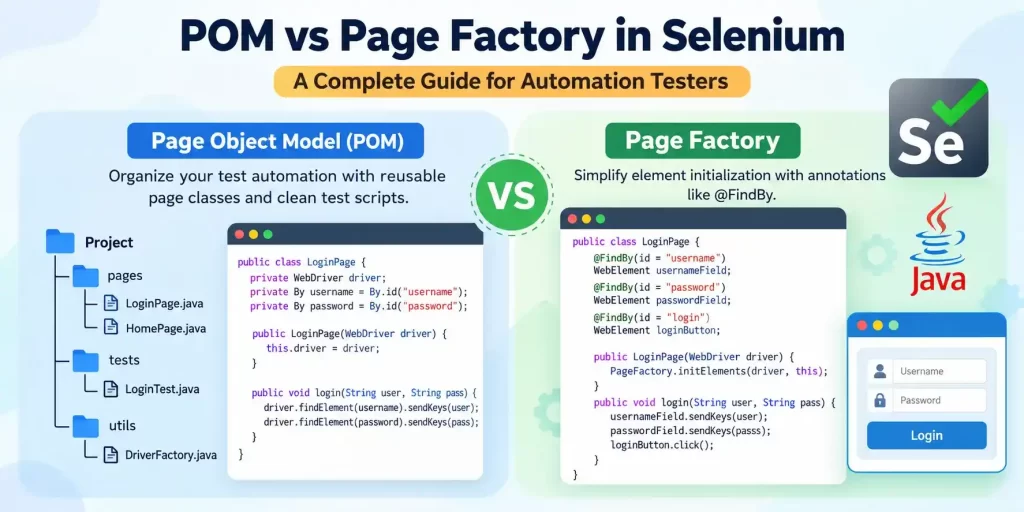
What Is the Page Object Model in Selenium?
The Page Object Model (POM) is a design pattern used in Selenium automation testing to make test scripts easier to write, read, and maintain. It helps testers organize the code for a web application by keeping page elements and page-related actions separate from the test cases.
For example, imagine you are automating the login page of a website. The page contains a username field, a password field, and a login button. Instead of writing the locators and actions for these elements in every test script, you can create a separate Java class for the login page. This class stores the page elements and defines actions such as entering login details and clicking the login button.
The test class can then use these methods to execute different test cases. If the website’s UI changes, you can update the relevant page object class instead of modifying every test script that uses the same elements.
The Page Object Model also helps create a clear object repository for web elements and supports better code reuse. It is useful for both small Selenium projects and large automation testing frameworks.
In the following sections, let’s understand how the Page Object Model works, what page objects and page classes are, and why this design pattern is widely used in Selenium WebDriver.
What Is POM in Selenium Automation?
The Page Object Model (POM) is a design pattern used in Selenium automation testing to make test scripts easier to write, read, and maintain. It helps testers organize the code for a web application by keeping page elements and page-related actions separate from the test cases.
For example, imagine you are automating the login page of a website. The page contains a username field, a password field, and a login button. Instead of writing the locators and actions for these elements in every test script, you can create a separate Java class for the login page. This class stores the page elements and defines actions such as entering login details and clicking the login button.
The test class can then use these methods to execute different test cases. If the website’s UI changes, you can update the relevant page object class instead of modifying every test script that uses the same elements.
The Page Object Model also helps create a clear object repository for web elements and supports better code reuse. It is useful for both small Selenium projects and large automation testing frameworks.
In the following sections, let’s understand how the Page Object Model works, what page objects and page classes are, and why this design pattern is widely used in Selenium WebDriver.
public class LoginPage {
    WebDriver driver;

    By username = By.id("username");
    By password = By.id("password");
    By loginButton = By.id("login");

    public LoginPage(WebDriver driver) {
        this.driver = driver;
    }

    public void enterUsername(String user) {
        driver.findElement(username).sendKeys(user);
    }

    public void enterPassword(String pass) {
        driver.findElement(password).sendKeys(pass);
    }

    public void clickLogin() {
        driver.findElement(loginButton).click();
    }
}
In this example, LoginPage is a page object class. It stores the locators and methods required to interact with the login page. A separate test class can use these methods to execute login test cases.
The main purpose of POM is to make Selenium code reusable, organized, and easier to update. POM is a design pattern, not a built-in Selenium class. You create and structure the page object classes based on your application’s UI.
How Does the Page Object Model Design Pattern Work?
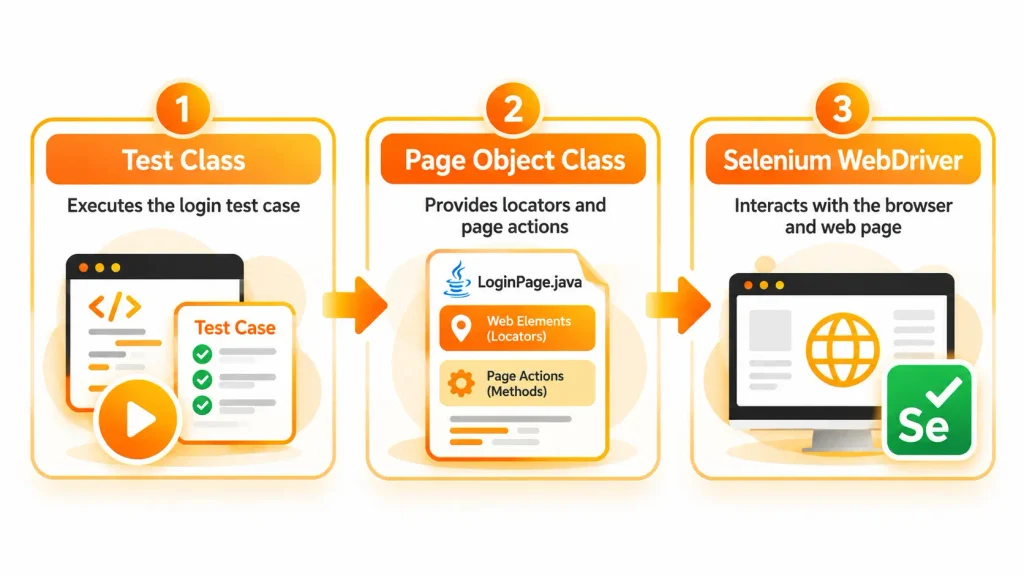
The Page Object Model works by separating the responsibilities of a test script from the code used to interact with a web page. Instead of placing all the locators and actions directly inside a test case, you create page object classes that handle those interactions.
A typical POM-based Selenium project has three main parts:
- 1. Page object class: Contains the locators and methods needed to interact with a particular web page.
- 2. Test class: Contains the test cases and uses page object methods to perform actions.
- 3. WebDriver setup: Starts the browser and provides the driver required to interact with the application.
Let’s understand this with a simple login example.
Suppose you want to test whether a user can log in successfully. The page object class contains methods to enter the username, enter the password, and click the login button. The test class calls these methods in the required order and checks whether the login was successful.
The workflow looks like this:
What Are Page Objects and Page Classes in Java?
In Selenium WebDriver, a page object represents a web page or a reusable component of a web page. A page class is the Java class used to define that page object’s elements and actions.
For example, an e-commerce website may have separate page object classes for the login page, home page, product page, shopping cart, and checkout page. Each class contains the locators and methods relevant to that part of the application.
Consider a simple login page class:
public class LoginPage {
    WebDriver driver;

    By usernameField = By.id("username");
    By passwordField = By.id("password");
    By loginButton = By.id("login");

    public LoginPage(WebDriver driver) {
        this.driver = driver;
    }

    public void login(String username, String password) {
        driver.findElement(usernameField).sendKeys(username);
        driver.findElement(passwordField).sendKeys(password);
        driver.findElement(loginButton).click();
    }
}
Here is what each part does:
- 1.
LoginPage: The Java class representing the login page. - 2.
WebDriver driver: Holds the browser driver used to interact with the page. - 3.
Bylocators: Identify the username field, password field, and login button. - 4. Constructor: Receives the WebDriver instance so the page class can use the same browser session.
- 5.
login()method: Enters the supplied credentials and clicks the login button.
A test class can create an object of LoginPage and call the login() method instead of writing all the interactions again.
One important point is that a page object does not have to represent an entire web page. It can also represent a reusable component, such as a navigation bar, search box, or menu.
By organizing code into meaningful Java classes, the Page Object Model supports reusable methods, improves readability, and makes large Selenium projects easier to maintain.
Benefits of Using the Page Object Model in a Selenium Project
The Page Object Model offers several benefits when building and maintaining a Selenium automation testing project. It helps teams organize their code and reduces the effort required to update test scripts when an application’s UI changes.
1. Code reusability
You can write a page action once and reuse it across multiple test cases. For example, the same login method can be used to test successful login, invalid passwords, and other login scenarios.
2. Easier maintenance
When a web element’s locator changes, you can update it in the relevant page object class. You do not need to change every test script that interacts with that element, provided the page object’s methods remain the same.
3. Better code organization
POM separates page-related interactions from test logic. This makes it easier to locate a method, understand its purpose, and manage a growing automation project.
4. Improved readability
Test cases become simpler because they can call meaningful methods such as login() or addProductToCart() instead of repeating several lines of Selenium code.
5. Reduced code duplication
Common page actions can be shared across test cases. This avoids writing the same locator definitions and browser interactions multiple times.
6. Easier collaboration
When a project has multiple testers, a clear page object structure helps them understand where page elements and actions are defined. It also makes it easier to divide work between different pages or components.
7. Better support for growing test suites
As an application gains more pages and features, a well-organized page object design makes the automation framework easier to extend.
However, POM does not automatically make tests reliable. Testers still need to choose correct locators, handle dynamic web elements, manage WebDriver properly, and write meaningful assertions.
What Is Page Factory in Selenium WebDriver?
Page Factory is a Selenium-supported mechanism that helps initialize and access web elements in a page object class. It is commonly used with the Page Object Model to organize Selenium automation code. Instead of locating every element manually using driver.findElement() inside each method, you can declare page elements using annotations such as @FindBy and initialize them using PageFactory.initElements(). This approach can make page classes easier to read and maintain. Page Factory is not a separate design pattern; it is a way to work with web elements within a page object design.
What Is PageFactory in Selenium Java?
In Selenium Java, PageFactory is a class provided by Selenium that helps initialize web elements declared in a page object class. It is commonly used with the @FindBy annotation to define how Selenium should locate elements on a web page.
For example, a login page may contain a username field, a password field, and a login button. Using Page Factory, you can declare these elements directly in your Java class rather than defining a separate By locator for each one.
import org.openqa.selenium.WebDriver;
import org.openqa.selenium.WebElement;
import org.openqa.selenium.support.FindBy;
import org.openqa.selenium.support.PageFactory;

public class LoginPage {

    @FindBy(id = "username")
    WebElement usernameField;

    @FindBy(id = "password")
    WebElement passwordField;

    @FindBy(id = "login")
    WebElement loginButton;

    public LoginPage(WebDriver driver) {
        PageFactory.initElements(driver, this);
    }

    public void login(String username, String password) {
        usernameField.sendKeys(username);
        passwordField.sendKeys(password);
        loginButton.click();
    }
}
In this example:
- 1.
@FindByspecifies the locator for each web element. - 2.
WebElementrepresents an element on the web page. - 3.
PageFactory.initElements(driver, this)initializes the elements declared in theLoginPageclass. - 4. The
login()method uses these elements to enter the login details and click the button.
Page Factory helps reduce repetitive locator-handling code and keeps page elements organized in one Java class.
How Does Page Factory Work With WebDriver?
Page Factory works with Selenium WebDriver by using the supplied driver to initialize the web elements declared in a page object class. It connects the element declarations to the browser interactions performed by the test script.
The basic workflow is:
- 1. Create a Java page object class for the required web page.
- 2. Declare the page elements using
WebElement. - 3. Use
@FindByto specify how Selenium should locate each element. - 4. Call
PageFactory.initElements(driver, this)in the class constructor. - 5. Create an object of the page class in the test class and call its methods.
For example, when a test creates a LoginPage object, the constructor initializes its declared elements through Page Factory. The test can then call methods such as login() to interact with the page.
By default, Page Factory commonly uses lazy-loading proxies for elements. This means the actual element lookup can happen when the element is accessed, rather than immediately when initElements() is called. The element still needs to be present and accessible when Selenium attempts to interact with it.
Page Factory does not replace WebDriver. WebDriver remains responsible for browser control, while Page Factory helps organize and initialize page elements.
How to Initialize Web Elements Using PageFactory
To use Page Factory, you need to declare the required web elements and initialize them with the WebDriver instance. The PageFactory.initElements() method performs this initialization.
Consider the following example:
import org.openqa.selenium.WebDriver;
import org.openqa.selenium.WebElement;
import org.openqa.selenium.support.FindBy;
import org.openqa.selenium.support.PageFactory;

public class SearchPage {

    @FindBy(name = "q")
    WebElement searchBox;

    public SearchPage(WebDriver driver) {
        PageFactory.initElements(driver, this);
    }

    public void search(String keyword) {
        searchBox.sendKeys(keyword);
        searchBox.submit();
    }
}
How to Initialize Web Elements Using PageFactory
To use Page Factory, you need to declare the required web elements and initialize them with the WebDriver instance. The PageFactory.initElements() method performs this initialization.
Consider the following example:
import org.openqa.selenium.WebDriver;
import org.openqa.selenium.WebElement;
import org.openqa.selenium.support.FindBy;
import org.openqa.selenium.support.PageFactory;

public class SearchPage {

    @FindBy(name = "q")
    WebElement searchBox;

    public SearchPage(WebDriver driver) {
        PageFactory.initElements(driver, this);
    }

    public void search(String keyword) {
        searchBox.sendKeys(keyword);
        searchBox.submit();
    }
}
Here, searchBox represents a search field identified by its name attribute. The constructor initializes the page elements, and the search() method enters a keyword and submits the search.
You can create and use the page object from a test class like this:
WebDriver driver = new ChromeDriver();
driver.get("https://www.google.com");

SearchPage searchPage = new SearchPage(driver);
searchPage.search("Selenium WebDriver");
This example assumes that the required Selenium imports and browser setup are available. In a complete test framework, you should also manage browser cleanup and use appropriate waits where necessary.
The main advantage is that the test script can use the page object’s methods without repeating the element initialization logic. If the locator needs to change, you can update it in the page class.
Understanding the @FindBy Annotation and Locators
The @FindBy annotation is used with Page Factory to specify how Selenium should locate a web element. It supports common locator strategies, including id, name, className, css, and xpath.
For example:
@FindBy(id = "username")
WebElement usernameField;

@FindBy(name = "password")
WebElement passwordField;

@FindBy(css = "button[type='submit']")
WebElement submitButton;

@FindBy(xpath = "//a[text()='Forgot Password?']")
WebElement forgotPasswordLink;
Each annotation identifies a particular page element using its corresponding locator strategy.
- 1.
id: Locates an element using its HTMLidattribute. - 2.
name: Locates an element using its HTMLnameattribute. - 3.
css: Uses a CSS selector to identify an element. - 4.
xpath: Uses an XPath expression to locate an element in the HTML structure.
When using Page Factory, you generally initialize the declared elements in the page class constructor:
public LoginPage(WebDriver driver) {
    PageFactory.initElements(driver, this);
}
After initialization, you can use the declared WebElement fields in methods such as sendKeys(), click(), and getText().
Choose locators that are clear and stable. For example, an element with a unique id is often easier to maintain than a long XPath expression. If a page changes dynamically, you may also need explicit waits or fresh element lookups to handle timing and stale-element issues.
The key point is that @FindBy defines how an element is located, while PageFactory.initElements() initializes the page object’s element fields for use in Selenium automation.
POM vs Page Factory in Selenium: Key Differences
| Comparison factor | Page Object Model (POM) | Page Factory |
|---|---|---|
| Meaning | A design pattern for organizing Selenium test code. | A Selenium mechanism for initializing and accessing page elements. |
| Main purpose | Separates page interactions from test scripts. | Simplifies element declarations and initialization in page classes. |
| Type | Design pattern. | Selenium support class and mechanism. |
| Web element declaration | Commonly uses By locators or WebElement fields. | Commonly uses WebElement fields with @FindBy. |
| Element initialization | Depends on how the page class is implemented. | Commonly uses PageFactory.initElements(). |
| Locator approach | Can use By.id(), By.name(), CSS selectors, XPath, and other locator strategies. | Supports locator strategies through annotations such as @FindBy. |
| Code organization | Organizes page elements and actions into page object classes. | Helps organize and initialize elements within those classes. |
| Reusability | Allows page methods to be reused across multiple test cases. | Supports reusable page object methods when used with POM. |
| Maintenance | Centralizes page interactions, making UI changes easier to manage. | Makes element declarations more structured, but locator changes still require maintenance. |
| Relationship | Can be implemented without Page Factory. | Can be used as part of a POM implementation. |
Difference Between Page Object Model and Page Factory
The main difference between the Page Object Model and Page Factory is their purpose. POM defines how you organize your Selenium automation code, while Page Factory provides a convenient way to initialize web elements inside page object classes.
With POM, you can create a Java class for a login page and define its locators and actions using standard Selenium methods. Page Factory can be used in that same class to declare elements with @FindBy and initialize them using PageFactory.initElements().
For example, a POM implementation without Page Factory might use a locator like this:
By username = By.id("username");

driver.findElement(username).sendKeys("testuser");
With Page Factory, the same element can be declared as:
@FindBy(id = "username")
WebElement username;

username.sendKeys("testuser");
Both approaches can be used to interact with the username field. The difference lies in how the element is declared and accessed, not in the overall design pattern.
Therefore, POM and Page Factory should not be treated as two competing design patterns. Page Factory is an optional mechanism that can support a POM-based Selenium framework.
Page Object Model and Page Factory: Structure, Locators, and Initialization
POM and Page Factory differ in how they organize and initialize page elements, but they can work together in the same Selenium project.
1. Structure
In POM, you create separate page object classes for pages such as Login, Home, Products, and Checkout. Each class contains the relevant page elements and actions.
Page Factory does not define this overall structure. Instead, it helps initialize the elements declared within those classes.
2. Locators
In a traditional POM implementation, you can define locators using Selenium’s By class:
By loginButton = By.id("login");With Page Factory, you can declare the element using an annotation:
@FindBy(id = "login")
WebElement loginButton;
Both approaches support common locator strategies. Your choice depends on your coding style and how you need to handle the elements.
3. Initialization
When using By locators, you generally call driver.findElement() when you need to locate the element.
With Page Factory, you typically initialize the page object’s elements in its constructor:
PageFactory.initElements(driver, this);Page Factory commonly uses lazy-loading proxies, so an element may be located when it is accessed. This does not guarantee that the element is ready for interaction; appropriate waits and error handling may still be required.
In short, POM determines how the automation code is structured, while Page Factory offers an alternative approach to declaring and initializing web elements.
Object Model and Page Factory: How They Work Together
The Page Object Model and Page Factory can be combined to build an organized Selenium automation framework. In this setup, POM provides the page object design, and Page Factory initializes the web elements inside each page class.
For example, consider a login test. You can create a LoginPage class that declares the username field, password field, and login button using @FindBy. The constructor initializes those fields through Page Factory, and the class provides a login() method.
The test class then creates a LoginPage object and calls the method to perform the login action.
LoginPage loginPage = new LoginPage(driver);
loginPage.login("testuser", "password123");
This approach keeps the test script focused on the test case rather than the details of locating each page element.
The responsibilities are separate:
- 1. POM: Organizes page classes and their actions.
- 2. Page Factory: Helps initialize the elements declared in those classes.
- 3. WebDriver: Controls the browser and performs the actual interactions.
Using both together can make a Selenium project easier to read and maintain. However, Page Factory is not mandatory. You can implement the same page object design using By locators and standard WebDriver methods.
Is Page Factory a Replacement for the Page Object Model?
No. Page Factory is not a replacement for the Page Object Model because both serve different purposes.
The Page Object Model is a design pattern used to organize Selenium code into page-specific classes. Page Factory is a mechanism for initializing web elements within those classes.
You can implement POM without Page Factory by defining locators with the By class and using driver.findElement() in your page methods. Alternatively, you can use Page Factory with @FindBy annotations to declare and initialize WebElement fields.
For example, both approaches can support a login page class with methods for entering credentials and clicking the login button. The difference is the way the elements are declared and initialized.
When building a Selenium automation framework, choose the approach that best suits your project’s needs. Focus on readable code, stable locators, proper waits, and easy maintenance rather than assuming that Page Factory is required for every POM implementation.
Implementing POM in Selenium Using Java
Implementing the Page Object Model in Selenium using Java involves creating separate page classes for web pages and keeping the test cases in dedicated test classes. Each page class contains the locators and methods needed to interact with the application’s UI, while the test class calls those methods to perform automation testing. This structure helps reduce repeated code, improves readability, and makes test scripts easier to maintain when page elements or application requirements change. Let’s implement a simple login page using POM without Page Factory to understand how this approach works.
Setting Up a Selenium WebDriver Project
Before implementing the Page Object Model, you need a Java project with Selenium WebDriver configured. You can use an IDE such as IntelliJ IDEA or Eclipse to create the project and manage its dependencies.
For this example, we will use Java, Selenium WebDriver, and Maven. Maven helps manage the libraries required for Selenium automation testing.
Step 1: Create a Maven project
Create a new Maven project in your preferred IDE and configure the project to use a compatible Java version.
Step 2: Add the Selenium dependency
Add the following dependency inside the dependencies section of your pom.xml file:
<dependency>
    <groupId>org.seleniumhq.selenium</groupId>
    <artifactId>selenium-java</artifactId>
    <version>4.27.0</version>
</dependency>
This example uses Selenium Java version 4.27.0. For a new project, check the latest compatible Selenium release and use that version if appropriate.
Step 3: Organize your project
You can create a structure like this:
SeleniumPOMProject
 ├── src
 │   └── test
 │       └── java
 │           ├── pages
 │           │   └── LoginPage.java
 │           └── tests
 │               └── LoginTest.java
 └── pom.xml
Here, the pages package contains the page object classes, while the tests package contains the test scripts.
Step 4: Set up WebDriver
Selenium Manager, included in modern Selenium releases, can help manage the browser driver when you create a browser instance such as ChromeDriver. Ensure that a compatible browser is installed.
Once the project setup is complete, you can create the login page class and start implementing the Page Object Model.
Creating a Page Class for a Login Page
The next step is to create a Java class representing the login page. This class stores the locators for the page elements and provides methods for interacting with them.
For our example, assume the login page contains three elements:
- 1. Username field
- 2. Password field
- 3. Login button
Create a file named LoginPage.java inside the pages package.
package pages;

import org.openqa.selenium.By;
import org.openqa.selenium.WebDriver;

public class LoginPage {

    WebDriver driver;

    By usernameField = By.id("username");
    By passwordField = By.id("password");
    By loginButton = By.id("login");

    public LoginPage(WebDriver driver) {
        this.driver = driver;
    }

    public void enterUsername(String username) {
        driver.findElement(usernameField).sendKeys(username);
    }

    public void enterPassword(String password) {
        driver.findElement(passwordField).sendKeys(password);
    }

    public void clickLogin() {
        driver.findElement(loginButton).click();
    }
}
Let’s understand the important parts of this class.
- 1.
WebDriver driver: Stores the WebDriver instance used to control the browser. - 2.
Bylocators: Identify the username field, password field, and login button using their HTML IDs. - 3. Constructor: Receives the existing WebDriver instance and assigns it to the page class.
- 4.
enterUsername(): Enters the supplied username. - 5.
enterPassword(): Enters the supplied password. - 6.
clickLogin(): Clicks the login button.
Notice that this class does not contain the complete test case. It only defines the elements and actions related to the login page. This separation is the main idea behind the Page Object Model.
The locators used here are examples. You must replace them with the actual locators available on the web page you want to automate.
Defining Web Elements and Locators in the Page Object Model
Locators help Selenium identify the elements available on a web page. When implementing POM, you define these locators inside the relevant page object class so that multiple test cases can reuse them.
Selenium supports several locator strategies, including ID, name, class name, CSS selector, and XPath.
For example, you can define locators like this:
By usernameField = By.id("username");
By passwordField = By.name("password");
By loginButton = By.cssSelector("button[type='submit']");
By forgotPasswordLink =
        By.xpath("//a[text()='Forgot Password?']");
Each locator identifies a specific page element using a different strategy.
How do you choose the right locator?
- 1. Use
idwhen the element has a unique and stable ID. - 2. Use
namewhen the element has a useful and reliable name attribute. - 3. Use CSS selectors when you need to identify elements using attributes or relationships.
- 4. Use XPath when you need to locate elements based on text or their position in the HTML structure.
For example, if the login button has the HTML attributeid="login", you can locate it using By.id("login").
When writing page object classes, avoid repeating the same locator in multiple methods. Keep each locator in one place and use meaningful names that clearly explain the element’s purpose.
You should also avoid unnecessarily complex locators because they can become difficult to maintain when the application’s UI changes. Choosing stable locators helps make Selenium test scripts more reliable.
Writing Selenium Tests Using Page Objects
After creating the LoginPage class, you can write a separate test class to execute the login test case. The test class creates a browser instance, opens the login page, and calls the methods defined in the page object.
For a simple demonstration, create a file named LoginTest.java inside the tests package.
package tests;

import org.openqa.selenium.WebDriver;
import org.openqa.selenium.chrome.ChromeDriver;
import pages.LoginPage;

public class LoginTest {

    public static void main(String[] args) {

        WebDriver driver = new ChromeDriver();

        try {
            driver.get("https://example.com/login");

            LoginPage loginPage = new LoginPage(driver);

            loginPage.enterUsername("testuser");
            loginPage.enterPassword("password123");
            loginPage.clickLogin();

        } finally {
            driver.quit();
        }
    }
}
This example demonstrates how a test script uses a page object to interact with a web page.
Here is how it works:
new ChromeDriver()starts a Chrome browser session.driver.get()opens the login page.new LoginPage(driver)creates a page object and passes the browser driver to it.- The test calls the methods to enter the username, enter the password, and click the login button.
driver.quit()closes the browser session, even if an error occurs inside thetryblock.
Replace https://example.com/login with the actual login page URL. The sample code demonstrates the interaction flow; it does not verify whether login succeeds. In a complete automated test, you should add assertions to check the expected result and use suitable waits when the page needs time to load.
For a larger project, you can use a test framework such as TestNG or JUnit to organize test cases, manage setup and teardown, and report test results.
With this implementation, the page object handles the login interactions while the test class controls the test flow. If the login button’s locator changes, you can update it in LoginPage.java without rewriting every test case that uses the same page object.
Implementing Page Factory in Selenium Using Java
Implementing Page Factory in Selenium using Java involves creating a page object class, declaring web elements with the @FindBy annotation, and initializing those elements using PageFactory.initElements(). Unlike a basic POM implementation that commonly uses By locators and driver.findElement(), Page Factory provides a convenient way to declare and access elements through WebElement fields. In this section, we will use a login page example to understand how to create a page object, initialize its elements, and execute Selenium test scripts using Page Factory.
Creating a Login Page Class Using PageFactory
The first step is to create a Java class for the login page. This class will contain the username field, password field, and login button. Instead of declaring separate By locators, we will use the @FindBy annotation to identify each element.
Create a file named LoginPage.java inside the pages package.
package pages;

import org.openqa.selenium.WebDriver;
import org.openqa.selenium.WebElement;
import org.openqa.selenium.support.FindBy;
import org.openqa.selenium.support.PageFactory;

public class LoginPage {

    @FindBy(id = "username")
    WebElement usernameField;

    @FindBy(id = "password")
    WebElement passwordField;

    @FindBy(id = "login")
    WebElement loginButton;

    public LoginPage(WebDriver driver) {
        PageFactory.initElements(driver, this);
    }

    public void enterUsername(String username) {
        usernameField.sendKeys(username);
    }

    public void enterPassword(String password) {
        passwordField.sendKeys(password);
    }

    public void clickLogin() {
        loginButton.click();
    }
}
Let’s understand the important parts of this class:
@FindBy: Defines how Selenium should locate a particular web element.WebElement: Represents an element on the web page, such as a text field or button.- Constructor: Receives the WebDriver instance and initializes the declared elements.
- Page methods: Provide reusable actions for entering credentials and clicking the login button.
This class follows the Page Object Model because it keeps the login page’s elements and actions separate from the test cases. Page Factory is used here to initialize the elements.
The locator values are examples. Replace them with the actual IDs or other suitable locators from your application’s HTML.
Initializing Web Elements With PageFactory.initElements()
The PageFactory.initElements() method initializes the web elements declared in a page object class. It connects the WebDriver instance to the element definitions so that the page class can interact with the browser.
The syntax is:
PageFactory.initElements(driver, this);Here:
driveris the WebDriver instance controlling the browser.thisrefers to the current page object instance.
This method is usually called inside the page class constructor, as shown below:
public LoginPage(WebDriver driver) {
    PageFactory.initElements(driver, this);
}
When you create a LoginPage object, the constructor initializes its declared elements through Page Factory.
For example:
LoginPage loginPage = new LoginPage(driver);After creating the object, you can call methods such as enterUsername() and clickLogin() without manually initializing each WebElement field.
Page Factory commonly uses lazy-loading proxies for the elements it initializes. As a result, the actual element lookup may happen when you access an element, rather than immediately when the constructor runs. This does not mean the element is guaranteed to be available or ready for interaction; appropriate waits may still be necessary.
Using PageFactory.initElements() helps reduce repetitive initialization code and keeps the page object class organized.
Using @FindBy to Locate Web Elements
The @FindBy annotation is used to define the locator for a web element in a Page Factory-based page object class. It supports different locator strategies, allowing Selenium to identify elements using attributes, CSS selectors, XPath, and other supported methods.
Consider these examples:
@FindBy(id = "username")
WebElement usernameField;

@FindBy(name = "password")
WebElement passwordField;

@FindBy(css = "button[type='submit']")
WebElement submitButton;

@FindBy(xpath = "//a[text()='Forgot Password?']")
WebElement forgotPasswordLink;
Each annotation specifies how to locate its corresponding element.
- 1.
@FindBy(id = "username")locates an element using its ID. - 2.
@FindBy(name = "password")locates an element using its name attribute. - 3.
@FindBy(css = "...")uses a CSS selector. - 4.
@FindBy(xpath = "...")uses an XPath expression.
Once the elements have been initialized, you can use standard Selenium methods such as sendKeys(), click(), and getText() to interact with them.
public void enterUsername(String username) {
    usernameField.sendKeys(username);
}
This method enters the supplied username into the field identified by @FindBy.
Choose locators that are stable and easy to understand. If the application’s UI changes or an element is loaded dynamically, you may need to update the locator, use explicit waits, or locate the element again to handle stale-element issues.
The important point is that @FindBy declares the locator, while PageFactory.initElements() initializes the page object’s element fields.
Writing Selenium Tests Using Page Factory
After creating the page class, the next step is to write a test script that uses its methods. The test class creates a WebDriver instance, opens the login page, creates a LoginPage object, and performs the required actions.
package tests;

import org.openqa.selenium.WebDriver;
import org.openqa.selenium.chrome.ChromeDriver;
import pages.LoginPage;

public class LoginTest {

    public static void main(String[] args) {

        WebDriver driver = new ChromeDriver();

        try {
            driver.get("https://example.com/login");

            LoginPage loginPage = new LoginPage(driver);

            loginPage.enterUsername("testuser");
            loginPage.enterPassword("password123");
            loginPage.clickLogin();

        } finally {
            driver.quit();
        }
    }
}
How this test works:
- 1.
ChromeDriverstarts a Chrome browser session. - 2.
driver.get()opens the login page. - 3.
new LoginPage(driver)Creates the page object and initializes its web elements using Page Factory. - 4. The test calls the page methods to enter the username, enter the password, and click the login button.
- 5.
driver.quit()closes the browser session when the test finishes.
Replace the example URL with your actual login page URL. This code demonstrates browser interactions but does not verify whether the login was successful. For a complete automated test, add assertions to check the expected result and use suitable waits when the page or its elements load asynchronously.
In a real project, you can use TestNG or JUnit to organize test cases and manage test execution. Page Factory can be used with these frameworks because it focuses on initializing page elements rather than controlling how test cases are executed.
With this approach, the test class remains focused on the test flow, while the page object class manages the login page interactions. This combination of POM and Page Factory can make Selenium automation code easier to read and maintain.
Advantages and Limitations of POM and Page Factory
The Page Object Model and Page Factory help organize Selenium automation code, but they serve different purposes and have different strengths and limitations. POM improves the structure of a test automation framework by separating page interactions from test cases, while Page Factory offers a convenient way to declare and initialize web elements. Understanding their advantages and limitations helps you choose an approach that suits your application’s UI, project size, and maintenance requirements.
Advantages of Using the Page Object Model
The Page Object Model offers several benefits when developing Selenium automation testing projects. Its main purpose is to make test scripts reusable, organized, and easier to maintain.
- 1. Code reusability: You can define a page action once and reuse it across multiple test cases.
- 2. Easy maintenance: If a locator changes, you can update it in the relevant page object class instead of modifying every test script that uses the element.
- 3. Better readability: Test classes can use meaningful methods such as
login()oraddProductToCart()instead of repeating multiple Selenium commands. - 4. Reduced code duplication: Common actions and locator definitions can be maintained in one place.
- 5. Clear separation of responsibilities: Page classes manage page interactions, while test classes handle test scenarios and assertions.
- 6. Support for larger projects: Separate page object classes help keep automation code organized as the number of pages and test cases increases.
- 7. Easier teamwork: A consistent page object design helps multiple testers understand and maintain the same framework.
For example, an e-commerce application may have separate page classes for Login, Products, Cart, and Checkout. Each class contains the methods required for its page, allowing test cases to reuse those methods.
However, POM does not automatically make tests reliable. You still need suitable locators, proper waits, meaningful assertions, and good test design.
Advantages of Using Page Factory in Selenium
Page Factory can make page object classes more convenient to write by providing a structured way to declare and initialize web elements.
Its main advantages include:
- 1. Simplified element declarations: The
@FindByannotation allows you to declare locators directly alongsideWebElementfields. - 2. Centralized element definitions: The page class keeps its element declarations together, making them easier to review and update.
- 3. Convenient initialization:
PageFactory.initElements()initializes the declared elements without requiring you to assign each field manually. - 4 . Readable page classes: Methods can interact directly with fields such as
usernameFieldandloginButton. - 5. Compatibility with POM: Page Factory can be used within a Page Object Model implementation to organize page elements and actions.
- 6. Support for common locator strategies: Annotations can use IDs, names, CSS selectors, XPath, and other supported locator options.
For example, you can declare a login button like this:
@FindBy(id = "login")
WebElement loginButton;
After initializing the page object, you can interact with the button using:
loginButton.click();This can make the code more concise than repeatedly calling driver.findElement() in page methods.
However, Page Factory is optional. It does not replace WebDriver, improve locator quality automatically, or remove the need to handle dynamic elements and synchronization.
Limitations of Page Factory and Element Initialization
Although Page Factory provides a convenient way to initialize web elements, it also has limitations that testers should understand before using it in a Selenium project.
- 1. Additional abstraction: Developers need to understand
@FindBy,PageFactory.initElements(), and how Page Factory initializes elements. - 2. No automatic waiting: Initializing a page object does not guarantee that elements are visible, clickable, or ready for interaction. Explicit waits may still be necessary.
- 3. Dynamic element challenges: Web pages that update frequently can cause stale-element or timing issues. Page Factory does not eliminate these problems.
- 4. Debugging can be less direct: Because Page Factory commonly uses proxies for lazy element lookup, an element lookup error may occur when the field is accessed rather than when the page object is created.
- 5. Limited benefit for some projects: For simple pages or projects that prefer direct locator control, using
Bylocators may be easier to understand and maintain. - 6. Locator maintenance is still required: If the UI changes, the corresponding
@FindBylocator may need to be updated.
For example, suppose a page replaces a search field dynamically after a user selects a category. A previously located element may become stale, depending on how the page and element are handled. You may need to locate the updated element again and use appropriate waits.
For this reason, choose Page Factory based on your team’s needs rather than assuming it is always better than using By locators. Also, check the documentation for your Selenium version when deciding whether to use Page Factory in a new framework.
How POM and Page Factory Fit Into a Selenium Automation Framework
POM and Page Factory can work together in the same Selenium automation framework, but their responsibilities are different. POM defines the overall page object design, while Page Factory provides a mechanism for initializing the elements declared in those page objects.
A typical framework may contain the following components:
| Component | Responsibility |
|---|---|
| WebDriver setup | Starts the browser and manages the browser session. |
| Page object classes | Store page locators and reusable page actions. |
| Page Factory | Initializes annotated web elements when this approach is used. |
| Test classes | Execute test cases and verify expected results. |
| Test data | Stores input values such as usernames and passwords. |
| Test reports | Record test execution results and failures. |
For example, in a login test, the WebDriver setup starts the browser, the LoginPage class provides the login actions, and Page Factory initializes the annotated elements if the project uses it. The test class enters the credentials and verifies the result using assertions.
You can also build the same framework without Page Factory by using By locators inside your page object classes. Both approaches can follow the Page Object Model.
The most important factor is a clean separation between test logic and page interactions. A well-designed framework should use stable locators, appropriate waits, meaningful assertions, and reusable methods. Choose Page Factory only when its element declaration and initialization style make the framework easier for your team to maintain.
POM vs Page Factory: Which Approach Should You Choose?
Choosing between the Page Object Model and Page Factory depends on your project requirements, coding preferences, and maintenance needs. However, they are not direct alternatives: POM is a design pattern, while Page Factory is a mechanism that can be used within a POM-based framework. You can implement POM with standard By locators or use Page Factory to initialize elements through annotations. The right choice is the approach that keeps your Selenium test scripts readable, reliable, and easy to maintain.
When to Use the Page Object Model
The Page Object Model is a good choice when you want to organize your Selenium automation code into reusable page classes and separate page interactions from test cases.
Consider using POM when:
- 1. You are building a new Selenium automation framework.
- 2. Your application has multiple pages and many test cases.
- 3. You want to reduce repeated locator definitions and browser interactions.
- 4. Multiple testers need to work on the same automation project.
- 5. You expect the application’s UI to change over time.
- 6. You want greater control over element location, waits, and interaction logic.
For example, an e-commerce website may have login, product search, shopping cart, and checkout pages. You can create a separate page object class for each page and reuse its methods across different test cases.
POM also gives you flexibility in choosing how to locate elements. You can use By locators with driver.findElement(), declare WebElement fields, or adopt Page Factory where appropriate.
For most Selenium projects, focusing on a clear page object structure is more important than choosing a particular element initialization technique.
When to Use Page Factory in Selenium WebDriver
Page Factory can be useful when you prefer declaring web elements with annotations and initializing them through a standard mechanism.
Consider using Page Factory when:
- 1. You already have a POM-based framework that uses
@FindBy. - 2. Your team is comfortable working with
WebElementfields and annotations. - 3. You want page classes with centralized element declarations.
- 4. Your project benefits from the convenience of
PageFactory.initElements(). - 5. You are maintaining an existing automation framework that already uses Page Factory.
For example, you can declare a username field using @FindBy(id = "username") and initialize it through the page class constructor. Your test script can then call a page method to enter the username.
However, Page Factory does not automatically handle waits, dynamic page updates, or stale elements. You still need to manage these situations using appropriate Selenium techniques.
For a new project, evaluate whether Page Factory makes your code easier to understand. If direct By locators are simpler for your team, there is no requirement to use Page Factory.
Can You Use POM and Page Factory Together?
Yes. You can use the Page Object Model and Page Factory together because they serve different purposes.
POM defines how you organize your automation code, while Page Factory provides a way to initialize web elements within page object classes.
For example, a login page can use Page Factory to declare its elements and POM to organize the page’s actions into reusable methods.
public class LoginPage {

    @FindBy(id = "username")
    WebElement usernameField;

    @FindBy(id = "login")
    WebElement loginButton;

    public LoginPage(WebDriver driver) {
        PageFactory.initElements(driver, this);
    }

    public void login(String username) {
        usernameField.sendKeys(username);
        loginButton.click();
    }
}
A test class can create a LoginPage object and call its login() method. This keeps the test logic separate from the page interactions.
In this example, LoginPage follows the Page Object Model, and Page Factory initializes the annotated elements. You can build a similar page class without Page Factory by using By locators and driver.findElement().
Therefore, using both together is a valid approach, but Page Factory remains optional.
Which Approach Is Better for Modern Test Automation?
For modern Selenium automation testing, the Page Object Model is a useful starting point for organizing test code. It encourages reusable page classes and separates test scenarios from browser interactions.
Page Factory can be added if its annotation-based element declarations suit your framework. However, it is not necessary for implementing POM, and it does not automatically make tests faster or more reliable.
Use the following guide when making your decision:
| Project requirement | Suggested approach |
|---|---|
| Starting a new Selenium framework | Begin with POM. |
| Want direct control over locator lookup | POM with By locators. |
| Prefer annotation-based element declarations | POM with Page Factory. |
| Maintaining an existing Page Factory framework | Continue if it meets your needs and remains maintainable. |
| Handling highly dynamic web elements | Choose the element strategy that supports clear locator control and reliable waits. |
When developing a new framework, prioritize stable locators, explicit waits where needed, meaningful assertions, and clean page object classes. These practices matter more than whether you use Page Factory.
In short, use POM to structure your Selenium project and decide whether Page Factory offers a practical benefit for your team. Both approaches can support maintainable automation when implemented correctly.
Common Mistakes When Using POM and Page Factory
While implementing the Page Object Model and Page Factory in Selenium WebDriver, beginners may face issues with element initialization, incorrect locators, and dynamic web elements. These mistakes can cause test scripts to fail even when the overall page object design is correct. Understanding these common problems helps you write more reliable automation code, identify errors quickly, and maintain your Selenium framework as the application’s UI changes.
Incorrect WebDriver and Web Element Initialization
One common mistake is using a WebDriver instance before it has been initialized or failing to pass the correct driver instance to a page object class. Without a valid driver, Selenium cannot interact with the browser, and the test may fail with a NullPointerException or another initialization error.
For example, consider this incorrect code:
public class LoginPage {

    WebDriver driver;

    public void enterUsername(String username) {
        driver.findElement(By.id("username"))
              .sendKeys(username);
    }
}
In this example, the driver field is declared but never assigned a WebDriver instance. Calling enterUsername() can cause a NullPointerException.
You can fix this by passing the driver through the constructor:
public LoginPage(WebDriver driver) {
    this.driver = driver;
}
When using Page Factory, initialize the page elements in the constructor as well:
public LoginPage(WebDriver driver) {
    this.driver = driver;
    PageFactory.initElements(driver, this);
}
Another mistake is forgetting to call PageFactory.initElements() when your page class relies on Page Factory to initialize its annotated elements. This can leave element fields uninitialized and cause errors when you try to use them.
Always ensure that the browser is started correctly, the same driver instance is passed to the page object, and the page elements are initialized according to the approach you have chosen.
Using Incorrect Locators in Page Objects
Another common mistake is selecting incorrect, unstable, or overly complicated locators. If Selenium cannot identify the required element, the test may fail with a NoSuchElementException or another element-related exception.
For example, this locator may be incorrect if the actual HTML element has a different ID:
By usernameField = By.id("user_name");If the page uses id="username" instead, Selenium will not find the element using the incorrect locator.
The same issue can occur with Page Factory:
@FindBy(id = "user_name")
WebElement usernameField;
To avoid these problems:
- Inspect the page’s HTML using browser developer tools.
- Verify that the locator matches the actual element.
- Prefer unique and stable attributes, such as a reliable ID.
- Avoid long XPath expressions when a simpler locator is available.
- Update locators when the application’s UI changes.
- Use meaningful names for locator fields so their purpose is clear.
Remember that Page Factory does not automatically correct invalid locators. Whether you use By locators or @FindBy, Selenium needs a valid locator to identify the intended element.
Handling Dynamic Web Elements in Selenium Tests
Modern web applications often update their UI dynamically. Elements may appear after an API response, disappear after an action, or be replaced when a section of the page refreshes. These changes can cause timing problems or stale-element errors in Selenium tests.
For example, clicking a login button may trigger a page update. If the test tries to access a new element before it becomes available, the interaction may fail.
A common solution is to use an explicit wait:
WebDriverWait wait = new WebDriverWait(
    driver, Duration.ofSeconds(10)
);

WebElement dashboard = wait.until(
    ExpectedConditions.visibilityOfElementLocated(
        By.id("dashboard")
    )
);
This code waits for the dashboard element to become visible, up to the specified timeout.
Make sure to import the required Selenium classes, including WebDriverWait, ExpectedConditions, and Duration.
When using POM, you can keep reusable wait logic in a suitable page method or shared utility. With Page Factory, remember that initializing an annotated element does not guarantee that it is immediately available for interaction.
For dynamic elements, you may need to locate the element again after a page update, wait for the correct condition, or handle a StaleElementReferenceException when appropriate. Avoid using fixed Thread.sleep() calls as the default solution because they can make tests slower and less reliable.
Common PageFactory Errors and How to Fix Them
Page Factory can simplify element declarations, but incorrect initialization and locator definitions can still cause test failures. The following table covers common problems and their possible solutions.
| Error or problem | Possible cause | How to fix it? |
|---|---|---|
NullPointerException | The driver or element field was not initialized correctly. | Initialize WebDriver and pass it to the page object; call PageFactory.initElements() when using Page Factory. |
NoSuchElementException | The locator is incorrect, or the element is not available when lookup occurs. | Verify the locator and use an appropriate explicit wait. |
StaleElementReferenceException | The page updated and the previously referenced element is no longer attached to the current DOM. | Locate the element again and wait for the updated page state. |
ElementNotInteractableException | The element exists but cannot currently receive the intended interaction. | Check visibility, enabled state, overlays, and page readiness. |
TimeoutException | The expected condition did not occur within the wait duration. | Verify the condition and page behavior; adjust the timeout only when justified. |
Here is a simple checklist for troubleshooting Page Factory issues:
- 1. Confirm that the correct WebDriver instance is passed to the page class.
- 2. Check that
PageFactory.initElements(driver, this)is called when required. - 3. Inspect the element’s HTML and verify the
@FindBylocator. - 4. Confirm that the element is present and ready for the intended interaction.
- 5. Use explicit waits for conditions such as visibility or clickability.
- 6. Recheck the locator and page state if the application updates dynamically.
These steps help you identify whether the problem comes from initialization, locator selection, timing, or changes to the page.
A well-structured POM framework can make these errors easier to diagnose because page interactions are organized in dedicated classes. Page Factory can help organize element declarations, but reliable test automation still depends on correct locators, proper synchronization, and careful error handling.
FAQs On POM vs Page Factory
What Is the Main Difference Between POM and Page Factory?
The main difference is that the Page Object Model (POM) is a design pattern, while Page Factory is a Selenium mechanism for initializing web elements in page object classes.
POM organizes page elements and actions into separate classes, keeping test scripts independent of the details of page interactions. Page Factory uses annotations such as @FindBy and the PageFactory.initElements() method to initialize declared web elements.
You can implement POM with standard By locators without using Page Factory. You can also combine POM and Page Factory in the same Selenium automation framework.
Is PageFactory a Design Pattern in Selenium?
No. Page Factory is not a design pattern. It is a class provided by Selenium that helps initialize web elements declared in a page object class.
The Page Object Model is the design pattern used to organize page-specific elements and actions. Page Factory can support this design by allowing you to declare elements using @FindBy and initialize them through PageFactory.initElements().
Both can be used together, but Page Factory is optional when implementing POM.
What Is the Difference Between @FindBy and By Locators?
@FindBy and By are both used to identify web elements, but they are used differently.
By: A Selenium locator class used with methods such asdriver.findElement()anddriver.findElements().@FindBy: An annotation used with Page Factory to declare how aWebElementshould be located.
For example, a By locator can be used like this:
By username = By.id("username");
driver.findElement(username).sendKeys("testuser");
With Page Factory, the same field can be declared as:
@FindBy(id = "username")
WebElement username;

username.sendKeys("testuser");
The main difference is how the locator is declared and how the element is initialized and accessed. Both approaches can be used in a POM-based Selenium framework.
Why Is PageFactory.initElements() Used in Selenium?
PageFactory.initElements() is used to initialize the web element fields declared in a page object class, commonly those annotated with @FindBy.
For example:
public LoginPage(WebDriver driver) {
    PageFactory.initElements(driver, this);
}
Here, driver provides the browser session, and this refers to the current page object. Page Factory initializes the declared elements so that the class can use them in methods such as sendKeys() and click().
Page Factory commonly uses lazy-loading proxies, so an element may be located when it is accessed rather than immediately when initialization occurs. The method does not guarantee that the element is visible or ready for interaction; waits may still be required.
Is PageFactory Still Supported in Selenium 4?
Yes. Page Factory is available in Selenium 4 through the org.openqa.selenium.support package. You can use @FindBy and PageFactory.initElements() in Selenium 4 projects.
However, Page Factory is optional. You can implement the Page Object Model using By locators and standard WebDriver methods instead.
When starting a new project, consider your framework’s requirements and your team’s preferred coding style. Check the documentation for your Selenium version to confirm the available APIs and recommended practices.
Can Selenium Page Objects Work Without PageFactory?
Yes. Selenium page objects can work without Page Factory. You can define locators using the By class and use WebDriver methods to locate and interact with elements.
For example:
public class LoginPage {

    private WebDriver driver;
    private By username = By.id("username");

    public LoginPage(WebDriver driver) {
        this.driver = driver;
    }

    public void enterUsername(String value) {
        driver.findElement(username).sendKeys(value);
    }
}
This class follows the Page Object Model without using Page Factory. The locator is defined using By, and the page method uses driver.findElement() to locate the username field.
This approach gives you direct control over when elements are located. It is a valid option for both small and large Selenium automation frameworks.
What Is the Difference Between Selenium RC and Selenium WebDriver?
Selenium RC (Remote Control) is an older Selenium tool that used a server to execute browser automation commands. Selenium WebDriver uses browser-specific driver implementations or supported browser automation mechanisms to interact with browsers more directly.
The main differences are:
- 1. Architecture: Selenium RC required a separate RC server, while WebDriver uses browser driver implementations or supported automation protocols.
- 2. Execution: RC relied on JavaScript injection and a server-based communication approach; WebDriver provides browser automation through its driver architecture.
- 3. Performance and control: WebDriver generally provides more direct and reliable browser interaction than the older RC approach.
- 4. Current usage: Selenium RC is obsolete and no longer supported in modern Selenium releases. WebDriver is the standard approach for current Selenium automation testing.
For modern automation projects, learn Selenium WebDriver along with Java, locators, waits, assertions, and page object design.