What is a Package in Java?
Before thinking about ‘What is a package in Java?’, we can think about a folder. What is a folder? A folder is a container where we can keep all related files.
E.g.. Tour Photos, Latest Songs, and Books are examples of folders.
Packages are similar to Folders. Packages contain related Java Files together.
If Packages are similar to folders, why are they called packages?
Good Question. Packages are similar to folders, but not the same. Confused? Let’s make it clear. Packages contain Java Files which can be logically grouped together, like folders, but not limited to them. Apart from logical grouping of Java files, they get involved in some other activities too. What are those activities? Packages provide Access Protection and Name Space Management.
Access Protection is related to Encapsulation. Is my understanding correct?
Exactly that is right. If we create a class with a package-private (usually called default) Access Modifier, this class can be used/called only within the same package. If the class is created with a public access modifier, we can access it outside the package, too.
Eg.
A class that can be accessed within the same package:
class Tools
{
}
A class that can be accessed outside the package:
public class Graphics
{
}
I couldn’t understand your point, saying ‘Packages provide Name Space Management’. Could you elaborate on it?
Yes, of course. It is very easy to understand. Name Space Management means we can keep a Java file with the same name in two different packages. Hope this one you know already. Am I right? Please find the examples below for a clear understanding.
package one;
public class Bank // Class called Bank in package one.
{
}
package two;
public class Bank // Class called Bank in package two. (Observe the same name)
{
}
Make a note here, we should not create the same package names more than once, as they create new namespaces.
Packages are clear. Please explain how to create packages in Java.
Yes, that’s the second part. We should know the Naming Convention for creating packages.
1) Package names are written in all lowercase to avoid conflict with the names of classes or interfaces.
2) Organizations use their reversed Internet domain name to begin their package names—for example, com.selenium.mypackage for a package named mypackage created by a developer at selenium.com.
What happens if two programmers belonging to different projects (but in the same organization) create a package with the same name?
package com.mycompany.project1;
public class Square
{
}
package com.mycompany.project2;
public class Square
{
}
In the above example, project1 and project2 refer to different projects.
Explain – How to use classes from two different packages?
Sure. Consider we have a class called Rectangle in package one. One more class we have, called Square in package two.
package one;
class Rectangle
{
}
package two;
class Square
{
}
If we want to use Rectangle class members in the Square class, we have to ‘import’ them. The step is very simple.
package two;
import one. Rectangle; //Rectangle class from package one.
class Square
{
In the above example, you demonstrated only one class from package one.
What should one do if they have multiple classes and interfaces in a single package and they want to import every member of that package?
Importing every member (classes and interfaces) of another package, one by one, is not an optimal solution to go with. Asterisk(*) wildcard character will be used to achieve this.
import one.*;
Will import all the classes and interfaces of package one.
What is the Default Package in Java?
In the previous section, we have seen that packages. Somewhere I read that ‘What are all the default packages in Java‘ is a familiar Java Interview question. What is that?
Built-in packages are part of the Java Standard Library. They provide ready-made classes and interfaces for various functionalities like data structures, input/output, networking, GUI, and more.
Examples:
- java.lang package: This package contains important core classes like String, Math, and Object. A speciality of this package is that package is automatically imported. There is no need to import this package.
- java.util package: Contains the collections framework, random number generation, string parsing and scanning classes, and several miscellaneous utility classes. This package also contains legacy collection classes and legacy date and time classes.
- java.io package: Provides for system input and output through data streams, serialization, and the file system.
- java.sql package: Provides the API for accessing and processing data stored in a data source (usually a relational database like Oracle, MySQL, or PostgreSQL)
- java.time package: This is the main API for dates, times, instants, and durations.
- java.awt package: awt stands for Abstract Window Toolkit. It contains all of the classes for creating user interfaces and for painting graphics and images. A user interface object, such as a button or a scrollbar, is called a component. The Component class is the root of all AWT components.
- java.net package: net refers to Networking here. This package provides the classes for implementing networking applications.
Step-by-step instructions on how to create a user-defined package in Java?
Now, we can see how to create a user-defined package in Java, step by step.
Step-by-Step Package Creation in Command Line:
1) Create a class called Demo as below
package mypackage;
public class Demo
{
}
2) Save this file. [It is saved under Documents/learnings folder here.]
3) Create another class named User as below and save it in the same folder.
package another_package;
public class User
{
}
4) Now, it’s time for compilation. Open the folder location in Terminal (or Command Prompt).

5) Compile both the classes as below. Please note that the command we usually give is javac classname.java for compilation. But here, it is javac -d . classname.java

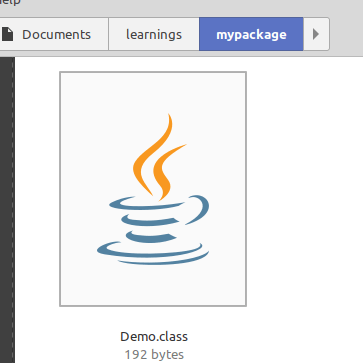
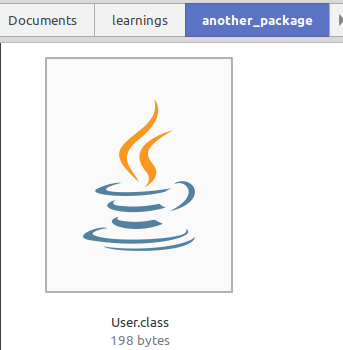
6) Two .class files for Demo.java and User.java will be present under their respective packages now.
Step-by-Step Package Creation in Eclipse IDE:
- Open Eclipse IDE.
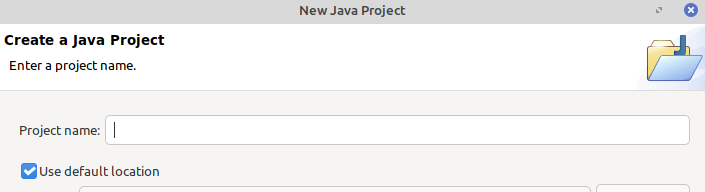
- Go to ‘File -> New -> Java Project’.
- Give the Project name and create a project. (For us, ‘First_Project’ is the project name).
- Go to File -> New -> Package
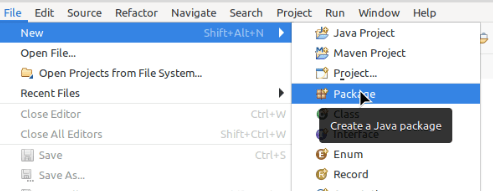
- Create a package ‘mypackage’ as below.
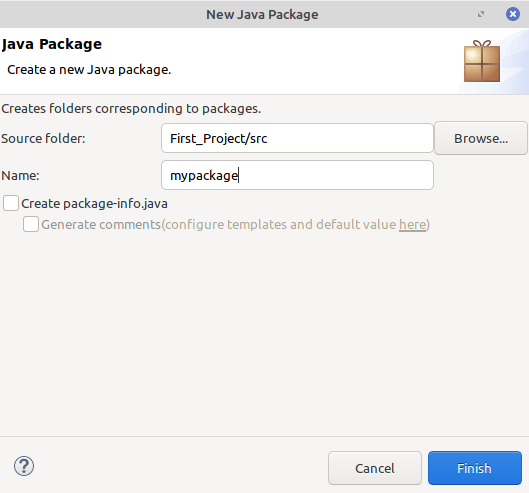
- Similarly, create a package called ‘another_package’.
Now, all the steps for creating classes in two different packages are done using the Eclipse IDE.
What is a subpackage in Java?
If packages are meant for folders, subpackages refer to subfolders. Inside a package, we can create sub-packages. For example, java.util is the package. Inside java.util package, we have java.util.function is the subpackage.
Advantages and Benefits of Packages in Java
- Easily determine which classes and interfaces are related.
- Our classes won’t conflict with other programmers as packages create new namespaces.
- Access Restriction is easier through packages.
Which Is True About the Package Statement in Java?
- A Package Statement should be the first statement in Java [True / False]
- Include is the keyword for importing a package in Java [True / False]
- Package names are case insensitive [True / False]
- A Java Source File can have only one package statement [True / False]
- The reverse of the Internet Domain is the package naming convention [True / False]
- Packages are useful for restricting access to classes and interfaces [True / False]
- Reserved Keywords can be used as package names [True / False]
Enjoyed this blog? Do follow us for such thought-provoking technical blogs more!
Start mastering Java today! Learn about Packages in Java with Payilagam, the Best Software Training Insitute in Chennai and take your coding skills to the next level.