Define Multithreading in Java
Imagine that you are building a project in Java that needs to download files, update the user interface (UI), and also needs to process the data, so here you need to do all at the same time. But how can you make your program do multiple tasks at once, like a human doing multiple tasks? That’s where our hero, multithreading in Java, comes in. In simple terms, multithreading in Java refers to the capability of a program to execute multiple threads simultaneously. A thread is the smallest unit of a process, and multithreading allows these threads to run concurrently, improving the performance and efficiency of applications.
In this blog, we are going to see the advantages and disadvantages of Multithreading and why it is important in applications and real-time examples.
Why does it matter in modern applications?
The modern applications demand instant responsiveness, high performance, and the ability to handle multiple tasks at the same time. Multithreading is crucial because:
-> Enhanced Performance: Tasks are executed in parallel, maximizing CPU usage.
-> Better Resource Management: Threads share memory efficiently.
-> Improved User Experience: Applications remain smooth without freezing during heavy operations.
-> Real-Time Processing: Essential for chat apps, online games, stock trading platforms, and other applications requiring simultaneous task execution.
Difference Between Multithreading and Multitasking in Java
In Java, both multithreading and multitasking are techniques used to achieve concurrent execution; they perform multiple tasks at the same time, but they operate at different levels.
Multithreading in Java
Multithreading is a subset of multitasking. It means executing multiple threads within a single process simultaneously, and each thread shares the same memory and executes independently.
For example, A server handles multiple requests simultaneously by assigning a new thread to each request within the single server.
Multitasking in Java:
-> It refers to executing multiple tasks at the same time(processes simultaneously)
-> Each task represents a separate program running independently.
-> For example, Running Chrome and VS Code running simultaneously.
There are two types of Multitasking:
1. Process-based multitasking: Multiple independent programs run concurrently.
2. Thread-based multitasking: Multiple threads run within a single process(this is Multithreading).
Difference between Multithreading and Multitasking:
| Multithreading | Multitasking |
| 1. Running Multiple threads within the same program. | 1. Running multiple programs simultaneously. |
| 2. Thread level of execution | 2. Process level of execution |
| 3. Thread shares the same memory space and resources. | 3. Separate memory and resources for each process. |
4. Managed by Java virtual machine(JVM). | 4. Managed by the operating system(OS). |
5. Threads are interdependent | 5. Processes run independently |
6. Multithreading is faster | 6. Multitasking is slower. |
| 7. It is highly efficient | 7. It is less efficient. |
Example code snippets:
Multithreading:
class MyThread extends Thread {
 private String threadName;
public MyThread(String name) {
       this.threadName = name;
       System.out.println("Creating " + threadName)  }
  public void run() {
       System.out.println("Running " + threadName);
       try {
           for (int i = 4; i > 0; i--) {
               System.out.println("Thread: " + threadName + ", " + i);
            Thread.sleep(500);
           }
       } catch (InterruptedException e) {
           System.out.println("Thread " + threadName + " interrupted.");
       }
       System.out.println("Thread " + threadName + " exiting.");
   }}
public class MultithreadingExample {
   public static void main(String[] args) {
       MyThread thread1 = new MyThread("Thread-1");
       thread1.start();
       MyThread thread2 = new MyThread("Thread-2");  thread2.start();
   }
}
Multitasking:
public class MultitaskingExample {
    public static void main(String[] args) {
        try {
            Runtime.getRuntime().exec("notepad.exe");
            Runtime.getRuntime().exec("calc.exe");
        } catch (Exception e) {
      e.printStackTrace();
        }
    }
}
Advantages of Multithreading in Java
Advantages of Multithreading in Java include improved performance, better resource utilization, and enhanced responsiveness, allowing programs to execute multiple tasks efficiently. By enabling concurrent execution, multithreading ensures real-time processing and smoother application performance, especially in tasks that require simultaneous operations.
- Improved Performance: Multiple threads run concurrently, making full use of the CPU and reducing execution time.
- Better Resource Utilization: Threads share the same memory, which is more efficient than creating multiple processes.
- Enhanced Responsiveness: Applications remain responsive to user input, even during heavy tasks.
- Real-Time Processing: Ideal for applications where multiple tasks must run simultaneously.
- Simplified Program Structure for Concurrent Tasks: Tasks like downloading files while updating UI can be handled efficiently.
Disadvantages of Multithreading in Java
Disadvantages of Multithreading in Java arise mainly from the complexity of managing multiple threads simultaneously. It can lead to issues like synchronization errors, higher resource usage, and debugging challenges such as deadlocks or race conditions, making the program harder to maintain and predict.
- Complexity in Programming: Writing thread-safe code requires careful handling of synchronization.
- Resource Overhead: Each thread consumes memory and CPU, so too many threads can reduce performance.
- Debugging Difficulty: Errors like deadlocks and race conditions are harder to detect and fix.
- Unpredictable Behavior: Thread execution order is not guaranteed.
- Potential Security Risks: Improper synchronization may expose sensitive data to concurrent access.
Real-Time Example of Multithreading in Java: Restaurant Cooking Tasks
Imagine a restaurant kitchen where multiple dishes are being prepared simultaneously. Each dish is handled by its own thread:
class CookingTask extends Thread {
    private String task;
    CookingTask(String task) {
        this.task = task;
    }
    public void run() {
        System.out.println(task + " is being prepared by " +
            Thread.currentThread().getName());
    }
}
public class Restaurant {
    public static void main(String[] args) {
        Thread t1 = new CookingTask("Pasta");
        Thread t2 = new CookingTask("Salad");
        Thread t3 = new CookingTask("Dessert");
        Thread t4 = new CookingTask("Rice");

        t1.start();
        t2.start();
        t3.start();
        t4.start();
    }
}
Explanation:
- Each CookingTask represents a dish being prepared.
- By extending Thread, each task runs independently and simultaneously.
- start() triggers each thread, and run() prints which dish is being cooked.
- Output demonstrates multiple tasks happening concurrently, just like a real kitchen.
Sample Output:
Pasta is being prepared by Thread-0
Salad is being prepared by Thread-1
Dessert is being prepared by Thread-2
Rice is being prepared by Thread-3
Types of Multithreading in Java
In Java, multithreading means running two or more parts of a program at the same time. Each part that runs separately is called a thread. It helps make programs faster and more efficient.
There are mainly two types of multithreading in Java:
1. Process-Based Multitasking
This means running many programs at the same time.
For example, you can play music, browse the internet, and download files all together.
Each program is a separate process and has its own memory, so they don’t affect each other.
2. Thread-Based Multitasking
This means running many threads inside a single program.
For example, in a chat app, one thread can send messages while another receives them at the same time.
All threads share the same memory, so they can easily communicate, but we must handle them carefully to avoid errors.
Life Cycle of Multithreading in Java:
To understand the life cycle of multithreading in Java, it’s important to know its life cycle, the different stages it goes through from start to end. The life cycle of multithreading in Java shows how a thread is created, starts running, and then finishes its task.
What Is the Life Cycle of a Thread?
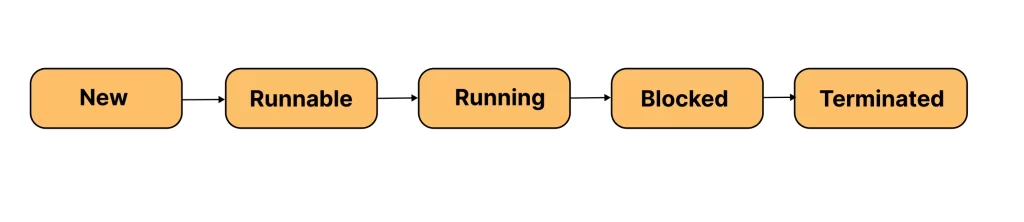
In Java, every thread passes through several states during its execution. These states are managed automatically by the Java Virtual Machine (JVM). The life cycle of multithreading in Java includes five main stages:
1. New (Born State):
When we create a thread using the Thread class, it is in the New state. At this point, the thread is not yet running.
Example: Thread t = new Thread();2. Runnable (Ready to Run):
When the start() method is called, the thread enters the Runnable state. It means the thread is ready to run but waiting for the CPU to assign time for execution.
t.start();3. Running:
Once the CPU gives time to the thread, it moves into the Running state. In this state, the thread’s run() method starts executing the code written inside it.
public void run() {
    System.out.println("Thread is running...");
}
4. Blocked (or Waiting):
Sometimes, a thread needs to pause or wait for another thread to complete its work (for example, using sleep() or wait() methods). In such cases, the thread enters the Blocked or Waiting state.
5. Terminated (Dead):
When the thread finishes its task or completes the run() method, it moves into the Terminated state. This means the thread’s life is over, and it cannot be started again.
Diagram: multithreading life cycle in Java
In Simple Words:
The multithreading life cycle in Java shows how threads are born, run, wait, and finally die after completing their work. Understanding this helps developers manage threads properly and avoid issues like deadlocks or performance problems.
Synchronization in Multithreading:
When you start learning multithreading in Java, one of the most important topics to understand is synchronization.
What Is Synchronization in Multithreading in Java?
In simple words, synchronization in multithreading in Java means controlling the access of multiple threads to shared resources (like variables, files, or data).
When several threads try to access and change the same data at the same time, it can cause problems or incorrect results. This situation is called a race condition. To prevent it, Java provides a feature called synchronization.
Using synchronization, we make sure that only one thread can access a shared resource at a time, while other threads wait for their turn.
This process keeps our program safe and gives correct and predictable results.
Example of Multithreading Synchronization in Java
Let’s see a simple example that shows how synchronization works using the synchronized keyword:
class BankAccount {
    private int balance = 1000;

    // synchronized method to prevent multiple access at the same time
    synchronized void withdraw(int amount) {
        if (balance >= amount) {
            System.out.println(Thread.currentThread().getName() + " is withdrawing...");
            balance -= amount;
            System.out.println(Thread.currentThread().getName() + " completed withdrawal. Remaining balance: " + balance);
        } else {
            System.out.println(Thread.currentThread().getName() + " - Not enough balance!");
        }
    }
}
public class SynchronizationExample {
public static void main(String[] args) {
BankAccount account = new BankAccount();
Thread user1 = new Thread(() -> account.withdraw(700), "User1");
Thread user2 = new Thread(() -> account.withdraw(500), "User2");
user1.start();
user2.start();
}
}How does it work?
- Both threads (User1 and User2) try to withdraw money at the same time.
- Without synchronization, both might withdraw before the balance updates, causing errors.
- But with the synchronized keyword, Java allows only one thread to use the withdraw() method at a time.
- This ensures data consistency and safety.
In Simple Words:
Multithreading synchronization in Java helps threads work together safely without interfering with each other’s data. It’s like having a “lock and key” — one thread locks the resource, uses it, and then unlocks it for others.
Exception Handling and Deadlock in Multithreading:
When working with multithreading in Java, different threads run at the same time, so things can go wrong unexpectedly. For example, a thread might be interrupted while it’s sleeping, or two threads might wait for each other forever. To avoid such problems, it’s important to understand exception handling in multithreading in Java and how to deal with deadlocks.
1. Exception Handling in Multithreading Java
In multithreading, exceptions can occur when threads perform risky operations — like file access, sleeping, or waiting. One of the most common exceptions is InterruptedException.
This happens when one thread interrupts another while it’s sleeping or waiting.
Let’s see a simple example:
class MyThread extends Thread {
    public void run() {
        try {
            System.out.println("Thread is going to sleep...");
            Thread.sleep(2000);
            System.out.println("Thread woke up successfully!");
        } catch (InterruptedException e) {
            System.out.println("Thread was interrupted!");
        }
    }
public class ExceptionHandlingExample {
public static void main(String[] args) {
MyThread t1 = new MyThread();
t1.start();
t1.interrupt(); // Interrupts the thread while it's sleeping
}
}Explanation:
- The thread starts and goes to sleep for 2 seconds.
- Before it wakes up, it gets interrupted using the interrupt().
- This throws an InterruptedException, which we handle using a try-catch block.
- Handling this properly ensures your program doesn’t crash suddenly.
2. Deadlock in Java Multithreading
A deadlock occurs when two or more threads are waiting for each other to release resources, and none of them can continue.
This situation causes the program to freeze because the threads are stuck forever.
Let’s understand with a simple example:
class Resource1 {}
class Resource2 {}
public class DeadlockExample {
public static void main(String[] args) {
Resource1 r1 = new Resource1();
Resource2 r2 = new Resource2();
Thread t1 = new Thread(() -> {
synchronized (r1) {
System.out.println("Thread 1 locked Resource 1");
try { Thread.sleep(100); } catch (Exception e) {}
synchronized (r2) {
System.out.println("Thread 1 locked Resource 2");
}
}
});
Thread t2 = new Thread(() -> {
synchronized (r2) {
System.out.println("Thread 2 locked Resource 2");
try { Thread.sleep(100); } catch (Exception e) {}
synchronized (r1) {
System.out.println("Thread 2 locked Resource 1");
}
}
});
t1.start();
t2.start();
}
}Explanation:
- Thread 1 locks Resource 1 and waits for Resource 2.
- Thread 2 locks Resource 2 and waits for Resource 1.
- Both are waiting for each other — and the program never ends.
This is a deadlock in Java multithreading.
How to Avoid Deadlocks?
✔ Always lock resources in the same order.
✔ Use timeout methods or tryLock() (from java.util.concurrent.locks) to avoid waiting forever.
✔ Keep the synchronized blocks as small as possible.
In Simple Words
In multithreading, exceptions and deadlocks are common but manageable problems.
- Exception handling keeps your threads running safely without crashing.
- Deadlock prevention ensures your program doesn’t get stuck waiting forever.
Together, they make your Java multithreading code reliable and efficient.
Popular Multithreading in Java Interview Questions
- What is multithreading in Java?
- What is the difference between a process and a thread?
- How do you create a thread in Java?
- What is the difference between the start() and run() methods in Java threads?
- What are the different thread states in Java?
- What is synchronization, and why is it important in multithreading?
- What is a daemon thread in Java?
- What is the difference between sleep() and wait() methods?
- What is a thread pool, and why is it used?
- What is the purpose of the volatile keyword in Java?
Multithreading in Java Interview Questions for Experienced Candidates
- What are the differences between synchronized and Lock interface in Java?
- What is a deadlock? How can you detect and prevent it?
- What is the difference between ConcurrentHashMap and HashMap?
- What are Callable and Future interfaces used for?
- What is the Java Memory Model (JMM) and why is it important?
- What is the difference between concurrency and parallelism?
- What is the Fork/Join framework, and when should you use it?
- What is ReentrantLock, and how does it differ from synchronized?
- What are common issues that can occur in multithreaded applications?
- Which classes and utilities from java.util.concurrent have you used, and why?
MCQ on Multithreading in Java
1. Which method is used to start a thread in Java?
A. run()
B. start()
C. execute()
D. begin()
Answer: B. start()
2. Which of the following is NOT a valid state in a Java thread lifecycle?
A. New
B. Runnable
C. Waiting
D. Stopped
Answer: D. Stopped
3. What is the correct way to create a thread by implementing the Runnable interface?
A. Thread t = new Thread(); t.start();
B. Runnable r = new Runnable(); r.run();
C. Thread t = new Thread(new MyRunnable()); t.start();
D. MyRunnable r = new MyRunnable(); r.start();
Answer: C. Thread t = new Thread(new MyRunnable()); t.start();
4. Which method pauses the execution of a thread for a specified time?
A. wait()
B. sleep()
C. pause()
D. yield()Answer: B. sleep()
Learn Java Multithreading with Payilagam
In the above blog, we have seen everything about Multithreading in Java, from its definition and life cycle to synchronization, exception handling, and real-time examples. Also, we have covered some key differences between multithreading, multitasking, and multiprocessing, along with a few interview questions for freshers and experienced, and MCQs to help you strengthen your Java skills for upcoming interviews.
Learning and mastering multithreading is an essential part of every Java developer’s career, especially those who are aiming to build fast, efficient, and scalable applications. At payilagam, we help our trainees to understand these core concepts in Java with project-oriented training and 1-on-1 training. As the Best Software Training Institute in Chennai, we focus on making our trainees job-ready with hands-on learning and expert guidance.
Take your first step in learning to become a skilled Java developer by joining our Java Full Stack Training in Chennai at Payilagam with a free demo class today. Learn from industry experts, build real projects, and land your first job with confidence.