Exception
Before going into exception handling in Java, let’s understand what an exception is.
Understanding the word Exception: a person or thing that is excluded from a general statement or does not behave in the expected way.
Example:
- ➜ Everyone in the class passed the exam — except one student who failed. That one student is an exception.
- ➜ All shops close at 9 PM, but KFC stays open all night. Here, KFC is an exception.
- ➜ Everyone must wear a uniform to school, but the principal doesn’t. The principal is an exception to the rule.
Understanding Exception in Programming Context
- ➜ In programming, an exception is an unexpected event or problem that occurs while your program is running — something that breaks the normal flow of execution.
- ➜ It’s not a syntax mistake (that’s a compile-time error) — it’s something that happens after the program starts running.
Examples of Exception in a programming context
- ➜ File Not Found: When your program tries to open a file that doesn’t exist in the given location. The code is correct, but the file is missing — something external went wrong, hence it’s an exception.
- ➜ Division by Zero: When we try to divide any number by zero, Java throws an ArithmeticException. Division by zero is mathematically undefined — your code didn’t expect it, so it becomes an exception.
- ➜ Input Mismatch: Your program expects a number, but the user types text instead. For example, your code asks for age (expects an int), but the user types “twenty”. Wrong input type = exception (InputMismatchException).
Why should we handle exceptions? Now that we know what an exception is — an unexpected event that breaks the normal flow of a program — the next question is.
Why should we even bother handling it? Why not just let the program crash and restart?
What Happens If We Don’t Handle Exceptions? When an exception occurs and is not handled, Java will:
- ➜ Stop the execution of the current method.
- ➜ Pass the exception up to the JVM (Java Virtual Machine)
- ➜ The JVM will terminate the program abruptly.
- ➜ We see a long and confusing error message (stack trace) on the console.
So, what’s the problem?
- ➜ The program stops working suddenly, leaving users confused and frustrated.
- ➜ Important data might be lost or corrupted.
- ➜ The overall user experience becomes poor.
What Happens When We Handle Exceptions? When exceptions are handled properly, Our program:
- ➜ Doesn’t crash unexpectedly.
- ➜ Shows a meaningful message to the user instead of technical errors.
- ➜ Continues running smoothly or recovers from the error.
- ➜ Keeps data safe and maintains application stability.
In short, exception handling allows your program to gracefully recover instead of breaking.
Additional clarity:
| Term | Meaning | When It Happens | Can Be Handled? |
| Bug | Mistake in code (logic or syntax) | Before or during compile time | Needs fixing by the developer |
| Error | Serious problem (like memory overflow) | Runtime | Usually, it cannot be recovered |
| Exception | Unexpected but recoverable situation | Runtime | Can be handled gracefully |
Introduction to Exception Handling in Java
Now that we have understood what an exception is and why we should handle it now let’s see how we handle exceptions in Java. Simply, the main way to handle exceptions in Java is by using the try-catch block.
Try catch block: wrap our risky code inside a try block and write one or more catch blocks to handle specific exception types.
Exception Handling Mechanism in Java: Here’s how exceptions are handled in Java internally, step by step:
1. Exception Occurs: When something unexpected happens (like dividing by zero or missing a file), Java creates an Exception Object that contains details such as the type of error and where it occurred.
2. Exception Object Is Thrown: The JVM “throws” this exception — meaning it starts searching for code that knows how to handle this specific problem.
3. Search for Matching catch Block: The JVM looks through the call stack (the list of methods that were called) to find a matching catch block that can handle that exception type
4. Exception Is Caught and Handled: If a matching catch block is found, the code inside it runs, and the program continues safely.
5. If No Handler Is Found: If no matching handler is found, the JVM terminates the program abruptly and prints the error message (stack trace).
Understanding try, catch finally:
- ➜ Try Block: The try block contains code that might throw an exception. It’s like saying, “Hey Java, watch this part — something risky might or might not happen here”
- ➜ Catch Block: The catch block handles the exception that occurs in the try block. We can have one or more catch blocks to handle different types of exceptions.
- ➜ Finally Block: The finally block contains code that always executes, whether an exception occurred or not. It’s mainly used for cleanup operations like closing files, database connections, or scanners.
Code example:
public class Example1 {
	public static void main(String[] args) {
    	try {
        	int result = 10 / 0; // risky code → ArithmeticException
    	} catch (ArithmeticException e) {
            System.out.println("Cannot divide by zero!");
    	}
        System.out.println("Program continues normally...");
	}
}
Code flow:
1. Java enters the try block.
2. When 10 / 0 executes, → ArithmeticException is thrown.
3. The try block stops immediately.
4. Java looks for a matching catch → finds catch (ArithmeticException e) → executes it.
5. After the catch block finishes, Java skips back to normal flow → prints “Program continues normally…”.
Handling multiple exceptions
How can we handle multiple exceptions in a project?
1. Multiple catch Blocks (Traditional Way): You can use one try block followed by multiple catch blocks. Each catch block handles a specific type of exception.
2. Multi-Catch Block: From Java 7, you can catch multiple exception types in one single catch block using the pipe (|) symbol. This makes your code shorter and cleaner when the handling logic is the same.
3. Multiple Independent try-catch Blocks
4. Nested try-catch Blocks: A nested try block means a try inside another try. This is helpful when a smaller piece of risky code inside a bigger one needs its own handling.
5. Global Exception Handling (Advanced): In large applications (especially web apps like Spring Boot), you don’t want to write try-catch everywhere. Instead, you can handle all exceptions in one central place — called global exception handling.
Types of Exception Handling in Java
Checked Exceptions (Compile-Time Exceptions)
- ➜ These are exceptions that the compiler knows about while you’re writing code.
- ➜ Java forces you to either handle them using a try-catch block or declare them using the throws keyword.
- ➜ If you don’t handle or declare them, our program won’t even compile.
Unchecked Exceptions (Runtime Exceptions)
- ➜ These exceptions occur while the program is running (not at compile time).
- ➜ The compiler does not force you to handle them.
- ➜ They usually happen because of programming logic mistakes, like dividing by zero or accessing a null object.
| Feature | Checked Exception | Unchecked Exception |
| Checked by the compiler? | Yes | No |
| When detected? | Compile-time | Runtime |
| Must be handled? | Yes | Optional |
| Cause | External issues (files, network, DB) | Logic errors (invalid data or null values) |
Global Exception Handling in Java
- ➜ When our application becomes larger (like web apps built with Spring Boot or Java EE), handling every exception with try-catch can make your code messy and difficult to understand and maintain.
- ➜ That’s where Global Exception Handling in Java comes in.
- ➜ Global exception handling means having one central place to handle all exceptions that occur anywhere in the program — instead of writing multiple try-catch blocks everywhere.
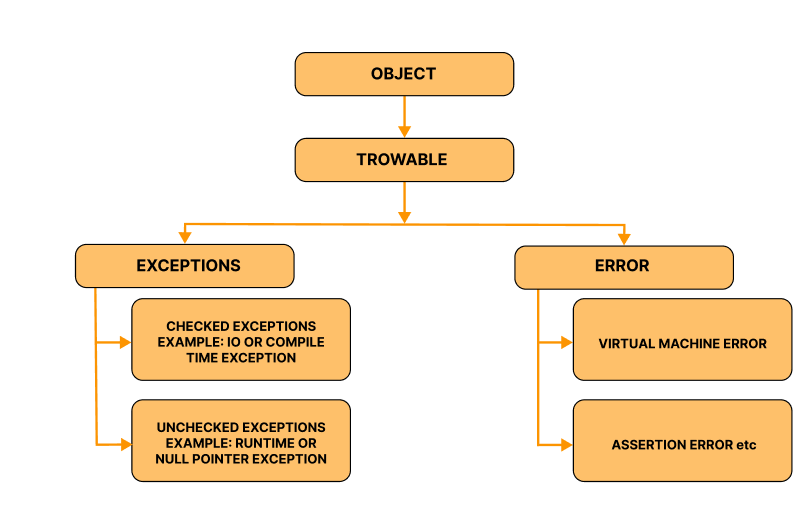
Hierarchy of Exception Handling in Java
Java defines several types of exceptions that relate to its various class libraries. Java also allows users to define their it’s exceptions.
Custom and User-Defined Exceptions
Why and when should you create a custom exception?
- ➜ We need meaningful names that describe the problem (e.g., InsufficientBalanceException), Specific to our use case.
- ➜ We want to enforce rules (validation) and guide callers on what went wrong.
- ➜ We need to attach extra info (like an error code, userId, or context).
Checked vs Unchecked (for custom exceptions)
- ➜ Checked (extends Exception) → caller must handle or declare. Good for recoverable issues (file missing, business rule violations you expect callers to handle).
- ➜ Unchecked (extends RuntimeException) → caller may handle (optional). Good for programming errors or invalid states (nulls, illegal arguments).
Exception Handling Best Practices
1. Use Specific Exceptions First: Always catch the most specific exceptions before the more general ones. Specific exceptions make your code more predictable and meaningful, while catching the general Exception class hides the real cause of an error. This also helps in debugging because you know exactly what kind of error occurred.
2. Keep Try Blocks Small: Only place the code that can actually throw an exception inside the try block. A large try block makes it harder to identify which statement caused the error and can lead to confusing debugging. Keeping the risky code small improves readability and control.
3. Avoid Swallowing Exceptions: Never catch an exception and do nothing with it. Ignoring exceptions hides real problems and makes it difficult to trace issues in the future. Every exception should either be logged, rethrown, or converted into a meaningful message for the user or developer.
4. Provide Meaningful Messages: Exception messages should clearly describe what went wrong and, if possible, why it happened. Good messages save time during debugging and help other developers understand the issue faster. Avoid vague or generic messages like “Error occurred.”
5. Add Context When Rethrowing Exceptions: When you rethrow an exception, add extra context about what your code was doing. This helps connect the original error to the higher-level business operation where it occurred. By including context, you make the stack trace more informative and the debugging process faster.
6. Use Custom Exceptions for Business Rules: In large applications, you can define your own exception classes to represent specific business logic problems. Custom exceptions improve code clarity by giving meaningful names to domain-related issues (for example, “InsufficientBalanceException” or “InvalidAgeException”). However, use them wisely and avoid creating unnecessary custom types.
7. Log Exceptions Properly: Logging is one of the most important aspects of exception handling. Every exception that isn’t directly handled in code should be logged with enough details to help diagnose the problem later. Log the message, stack trace, and relevant context, but avoid exposing sensitive data in logs.
8. Clean Up Resources Safely: Always release system resources like files, database connections, or network sockets, even when an error occurs. In Java, this is usually done using a finally block or the try-with-resources statement. This ensures your program doesn’t leak memory or lock system resources unnecessarily.
9. Use Checked and Unchecked Exceptions Wisely: Choose between checked and unchecked exceptions based on whether the caller can recover from the problem. Checked exceptions should represent recoverable issues (for example, file or network errors), while unchecked exceptions should represent programming mistakes or invalid logic that can’t be recovered from.
10. Centralize Exception Handling in Large Applications: In large or layered applications, handle exceptions in a centralized way rather than in every method. This avoids repetitive try-catch code and provides a single, consistent place to log or respond to errors. In frameworks like Spring Boot, this is done using global exception handlers.
Exception Handling Interview Questions
1. Can you explain the role of each try, catch, and finally block in exception handling?
- ➜ try block contains code that might throw exceptions.
- ➜ catch handles those exceptions.
- ➜ Finally executes code after try/catch, regardless of an exception, typically for cleanup.
2. What’s the difference between throw and throws in Exception Handling?
Throw:
- ➜ What it does: Used to explicitly throw an exception from a method or block of code.
- ➜ Where it’s used: Inside the method or block of code.
- ➜ Purpose: When we want to manually trigger an exception during execution.
- ➜ throw: Actually, throws an exception in the body of the method.o Use throw to throw an exception manually inside a method.
Throws:
- ➜ What it does: Used in the method signature to declare that a method might throw an exception. This is basically telling the calling method that this
- ➜ method might throw an exception, and the caller needs to handle it.
- ➜ Where it’s used: In the method declaration.
- ➜ Purpose: It doesn’t throw the exception; it just declares that the method may throw certain exceptions, so the caller can handle it with try-catch or further declare it using throws.
- ➜ throws: Declares that a method can throw an exception, so the caller can handle it.o Use throws in the method signature to declare that the method can throw certain exceptions.
3. Can a finally block be skipped in Exception Handling? If yes, when?
Yes — if the JVM halts abruptly (e.g., System.exit(0) before finally runs, or the process is killed, or a crash/error like OutOfMemoryError prevents it). Also, if a thread is interrupted in certain ways, finally may not run.
4. If both try and catch blocks have a return, which value is returned, and does finally still execute in Exception Handling?
- ➜ The finally block executes before the method returns. If finally also has a return, that return overrides the previous one. Otherwise, the value computed in try/catch is returned after finally runs.
- ➜ Why: finally always executes (barring JVM halt) and can change the return by returning itself — avoid returning from finally.
5. What are suppressed exceptions, and when do you see them? How to access them?
- ➜ Suppressed exceptions occur when an exception is thrown in a try block and another exception is thrown while closing resources (e.g., in try-with-resources). The closing exception is suppressed and attached to the primary exception; you can access suppressed exceptions via Throwable.getSuppressed().
- ➜ Suppressed exceptions prevent hiding the primary cause while retaining info about resource-close failures.
Learn Exception Handling Practically
Exception Handling is one of the most important topics every Java developer must understand clearly. It helps your program deal with unexpected problems smoothly instead of crashing suddenly. By using Exception Handling properly, you can make your code more reliable, readable, and user-friendly. Concepts like try, catch, finally, and custom exceptions are not just theory — they are real-world tools that make your applications stronger and easier to maintain.
Learning Exception Handling with hands-on examples gives you a clear idea of how Java programs behave when errors occur and how to recover from them. Practicing Exception Handling regularly also builds your confidence for interviews and real-time projects.
At Payilagam, our Java course training in Chennai covers Exception Handling in detail, along with other essential Java concepts. We focus on making every student understand not just the “how,” but also the “why” behind each topic. Join us to learn Exception Handling step-by-step, work on live exercises, and become confident in writing error-free Java programs.
Author: Shiva Guru
Senior Software Engineer: Java and Spring Boot