Become an Expert Full Stack Developer
Best Institute for Full Stack Java Training in Chennai
From Basic to Expert Level Project Oriented Training
100% Practical Oriented Training
Hackathons and Tech Meetup and Mock Interviews
Internship Support
Unlimited Job Placement Support
Excellent Placement Assistence!
Start attending interviews from day one and keep going untill you secure your dream job – no stress,no boundaries







Become a Full Stack Developer
Full Stack Developer Certification Course in Chennai at Payilagam is the best option for those looking to kickstart their career in full stack development. With a focus on web development, this full stack training program covers all aspects of becoming a successful Full stack developer. As a leading training institute in Chennai, Payilagam provides comprehensive placement support to help students land their dream job as a web developer upon completion of the course.
Module 1: Laying the Groundwork
- Introduction to Java
- Programming in Java
- Data Types
- Operators
- Methods
Module 2: Diving into OOPs
- Introduction to OOP
- Static
- Inheritance
- Constructors
- Encapsulation
- Polymorphism
- Abstraction
- Packages
Module 3: Mastering the Logic
- Conditional Control Constructs
- Looping Control Constructs
- Jump Statements
- Data Manipulation
Module 4: Data Structures & Algorithms
- Arrays
- Strings
- Collections Framework
- Advanced Programming
- Algorithms
Module 5: Exception Handling and Multi-threading
- Try-Catch Blocks
- Throw and Throws
- Finally Block
- Custom Exceptions
- Creating Threads
- Synchronisation
- Thread Communication
- Concurrency Utilities
Module 6: Java Frameworks & More
- Hibernate
- Session Management
- Mapping Entities
- HQL
- Caching
- Spring Framework
- Dependency Injection
- Spring Boot
- RESTful Services
- Microservices
Module 1:Spring MVC Architecture
- What is a server, basic client-server architecture
- Understanding HTTP methods.
- What is Spring and Spring Boot?
- Learning the architecture diagram of Spring MVC, understanding the flow of a Spring boot.
Module 2: Maven Key Concepts
- How to build a maven project.
- Maven Life Cycle.
- Building Jar and War.
- Difference between Jar and War.
Module 2: Registration Form Using Spring Boot.
- Understanding the basic Annotations used for building a Monolithic Enterprise Application.
- Creating Pojo, using Lombok dependency.
- Learn the basics of Thymeleaf
- Connecting Controller to View in MVC Model
- Validation of incoming request.
Module 3: Random Quote Generator in Spring Boot
- Adding List from Collection to Controller
- Creating Pojo, using Lombok dependency.
- Learn the basics of Thymeleaf
- Passing List of String Objects to View
Module 4: Color Picker using Spring Boot
- Getting Inputs from Thymeleaf View
- Passing it to Controller
- Learn the basics of Thymeleaf
- Passing List of String Objects to View
Module 5: Simple Calculator with Spring Boot
- Getting Inputs from View
- Passing inputs to Controller
- Processing inputs at Controller Side
Module 6: Product Catalogue for E-Commerce Site
- Adding Entity Class
- Passing Model Values to Controller
- Transforming Objects to View from Controller
Module 7: Quiz Application using Spring Boot
- Creating Quiz Application using Thymeleaf / React and Springboot and publishing the results
Module 8: To Do List
- Learning about HTTPSession Maintenance
- Creating To Do List with Thymeleaf / React
- Add To Do Item, Delete To Do Item
- Delete All To Do Items
Module 9: REST API Integration with SpringBoot
- What is REST API?
- How to Access API Response
- Accessing REST results through PostMan
- Open Weather Map API Integration
- Getting Weather Details
Module 11: Spring Exception Handling
- Inbuilt Exception Handling in Spring boot.
- Handling default exception and user defined exception.
- Presenting proper error messages as per the exception occurred.
Module 12: Usage of Log4j
- Usage of Log4j
- Adding Log4j in the project
- Generation of log for all the necessary services.
Module 13: Spring JPA
- What is a Repository and its types?
- Difference between CRUD and JPA repository.
- User-defined Query.
- Joining tables and do operations on the data.
Module 14: Spring Connectivity with PostgreSQL
- Usage of JDBC Driver.
- Setting path in application.properties file.
Module 15: Spring Security
- How spring security works.
- Explaining Spring Default authentication.
- Exploring Basic Auth methods.
- Create our own authentication credentials.
- Creating various roles for users.
- Authorization and Authentication as per roles.
Module 16: E-Commerce Project
- Creating JSON
- Product List Page
- Add To Cart Page
- Cart To Database
- Delete From Cart
- View Cart
Module 1: Introduction to Web Development
- Overview of web development and the role of HTML and CSS.
- Setting up a development environment (text editor, browser).
Module 2: HTML Fundamentals
- Understanding the structure of an HTML document.
- Creating headings, paragraphs, and lists.
- Adding links and images.
- HTML forms and input elements.
Module 3:CSS Fundamentals
- Introduction to CSS and its role in web design.
- Selectors, properties, and values.
- Applying inline, internal, and external CSS.
- Understanding the CSS Box Model.
Module 4:CSS Layout
- Working with margins, padding, and borders.
- Positioning elements (relative, absolute, fixed).
- Creating flexible layouts with CSS Flexbox.
- Responsive design and media queries.
Module 5 :CSS Transitions and Animations
- Adding interactivity with CSS transitions.
- Creating simple animations using keyframes.
- Introduction to CSS libraries and frameworks.
Module 6: Introduction to CSS Frameworks
- Overview of popular CSS frameworks like Bootstrap or Foundation.
- Using frameworks for rapid web development
Module 7: Final Projects and Portfolio Building
- Students work on individual or group projects.
- Building a personal portfolio website to showcase work.
- Review and feedback on final projects.
Prerequisites
- Basic understanding of HTML and CSS.
Module 1: Introduction to JavaScript
- Overview of JavaScript and its role in web development.
- Writing and executing simple JavaScript programs.
- Setting up a development environment (text editor, browser).
Module 2: JavaScript Fundamentals
- Data types, variables, and operators.
- Control flow: conditions (if/else), loops (for, while).
- Functions, parameters, and return values.
Module 3: Working with the DOM
- Understanding the Document Object Model (DOM).
- Selecting and manipulating DOM elements.
- Adding, modifying, and deleting HTML content.
Module 4: Event Handling and DOM Interaction
- Responding to user interactions with event listeners.
- Practical applications of events (click, hover, submit).
- Event propagation and delegation.
Module 5: Advanced DOM Manipulation
- Creating and appending elements dynamically.
- Modifying CSS styles and classes.
- Managing forms and form elements.
Module 6: Final Projects and Portfolio Building
- Students work on individual or group projects that utilize the DOM.
- Building interactive web applications.
- Review and feedback on final projects.
Module 1: Introduction to Databases and SQL
- What is a Database?
- Types of Databases
- Introduction to SQL
- SQL Syntax Basics
- Installing SQL Server(PostgreSQL)
Module 2: Retrieving Data
- SELECT statement and its clauses
- Filtering Data using WHERE clause
- Sorting Data using ORDER BY clause
- Using DISTINCT keyword
- Limiting Results using LIMIT, OFFSET
Module 3: Filtering and Sorting Data
- Using Comparison Operators
- Using Logical Operators
- Combining Conditions using AND, OR, NOT
- Sorting Data using ORDER BY clause
- Using NULL and IS NULL, IS NOT NULL operators
Module 4: Joins
- Introduction to Joins
- Inner Join
- Left Join
- Right Join
- Full Join
- Cross Join
- Self Join
Module 5: Data Modification
- INSERT statement
- UPDATE statement
- DELETE statement
- Modifying data using subqueries
Module 6: Aggregate Functions and Grouping Data
- Using Aggregate Functions (COUNT, SUM, AVG, MIN, MAX)
- GROUP BY clause
- HAVING clause
Module 7: Creating and Modifying Tables
- CREATE TABLE statement
- ALTER TABLE statement
- Adding and modifying columns
- Dropping and renaming tables
Module 8: Constraints and Indexes
- Primary Key Constraint
- Foreign Key Constraint
- Unique Constraint
Not Null Constraint - Creating and managing indexes
Module 9:Normalization
- 1st Normal Form
- 2nd Normal Form
- 3rd Normal Form
Module 10: Advanced Topics
- Stored Procedures
- User-Defined Functions
- Indexing Strategies
QUANTITATIVE AND REASONING APTITUDE
Module 1: Number Systems & Basic Math Magic
- Introduction to Quantitative
- Aptitude
- Number Systems
- Divisibility Rules
- Calculation of Remainder
- HCF and LCM
- Unit Digit Concept
- Calculating Number of
- Zeros
Module 2: Arithmetic - Your Daily Math Fix
- Ratio and Proportion
- Partnership
- Problems on Ages
- Percentage
- Profit and Loss
- Simple and Compound
- Interest
- Average
- Time and Work
- Time, Speed, and Distance
Module 4: Advanced Topics - Level Up Your Game
- Probability
- Permutations and Combinations
Module 5: Reasoning Skills - Crack the Code
- Number Series
- Letter Series
- Coding-Decoding
- Odd One Out
- Blood Relations
- Direction Sense
- Syllogism
- Seating Arrangements
- Order and Ranking
- Truth and Lie Puzzles
- Clocks and Calendars
- Venn Diagrams
Module 6: Non-Verbal Reasoning - Visual Puzzles
- Mirror Images
- Dot Position
- Paper Folding and Cutting
- Figure Patterns
Module 7: Data Interpretation - Decode the Data
- Introduction to Data
- Interpretation
- Tables
- Bar Graphs
- Pie Charts
- Line Graphs
Module 8: Data Sufficiency - Is It Enough?
- Introduction to Data Sufficiency
- Data Sufficiency Problems
PROFESSIONAL SKILLS
Module 1: Basic Communication
- What is Communication?
- Communication v/s English
- Grammar Basics
- Forming Sentences
- Verbal
Module 2: Interview Skills
- Resume Building
- Self-Introduction
- HR QnA
- Cracking Group Discussions
- JAM Round
- Face to Face Interviews
- Professional Grooming
- Confidence Building Activities
Module 3: Corporate Skills
- Email Writing
- Presentation Skill
- Networking & LinkedIn
- Corporate Etiquette
Build Projects during the Course and Build your Portfolio
Learn the latest tools and technologies used in the industry and gain valuable hands-on experience through working on real-world projects.

A responsive personal portfolio website built using only HTML and CSS. Showcases skills, experience, and projects with a clean layout.

A multi-page company website created for startups or software firms, featuring sections like Services, About, and Contact.

A landing page for restaurants showcasing food imagery, business hours, and location with responsive HTML and Tailwind CSS.

A quiz application with multiple-choice questions, score tracking, and result screen using HTML, CSS, and JavaScript.
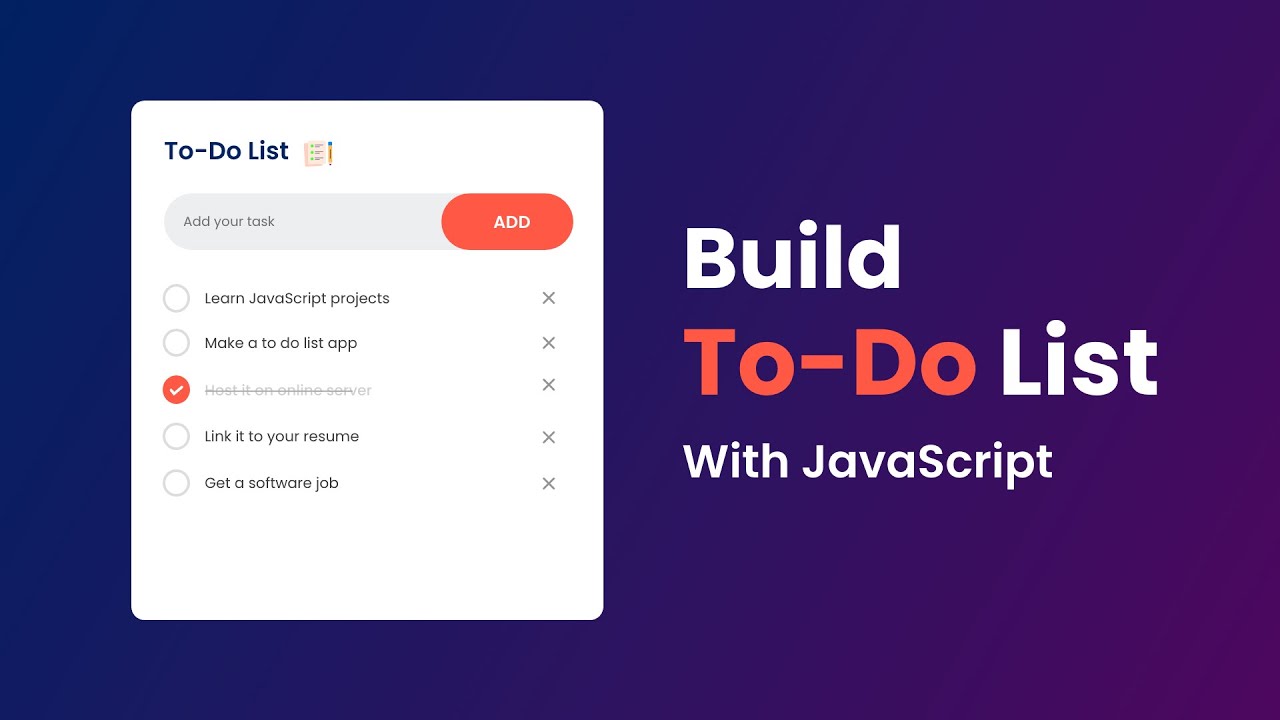
This project offers a simple yet effective task manager with add, complete, and delete functionality. Built using HTML, CSS, and JavaScript, it supports local storage to retain tasks even after a refresh.

Stay focused with this minimalist Pomodoro Timer. Clean transitions, real-time countdown, session switching — a modern, distraction-free productivity tool.

A weather forecast app using React.js that fetches live data to show temperature, humidity, and weather icons based on user input.
A real-time character counter built in React. It shows the number of characters typed and highlights state updates and dynamic rendering.

A complete interview prep platform built with React and Tailwind CSS. Includes coding rounds, MCQs, scoring, and a leaderboard.

A full-stack feedback app using Node.js, Express, and MongoDB. Users submit suggestions stored securely in a backend-managed system.
Build a Strong Career Foundation
Equip Yourself with Advanced Tools and Technologies
Get engaged yourself in learning the best, Advanced Tools and Technologies to enhance your career opportunities on par with top professionals.
Essential Tools for Modern Development
- Linux
- VS Code
- Eclipse
- Git
- Postman
- Postman
- STS
Learn
Practice
Push and Write
Hackathons, Meetups
Get Placed
Learning starts from listening and Questioning
Practising gives Perfection in design and development
Push code regularly to git and write your learnings as a blog
Create your own network through attending Hackathons, Meetups regularly
Display your portfolio and get ready for your dream job!
Course Fee
With more than 12 Years in the field of IT Training in Chennai, Payilagam offers seamless training in both Class Room and Online Training with excellent placement opportunities until you get place.
Enjoy Fun Filled Learning with Placement Assistance
Get the best learning environment where your career is redesigned. Learn to unlearn.
₹23999
₹26999
Prepayment
What's Included - Explore Our Unique Offerings
FULL STACK JAVA DEVELOPER CERTIFICATION
Your Path to Certification Begins Here
Govt. Registered Training Provider
Get Certificate from government registered training institute in Chennai
Easily Sharable
Share your learning with our Certificate through unique URL or Code Linkedln, Resumes

Interactive
Live & Instant Support: Real-time classes with direct interaction and swift query resolution for a smooth learning experience
Expert
Expert Guidance: Learn from industry experts and receive personalized mentoring to navigate your career path
Comprehensive
Individualized Help: Continuous, customized support to tackle technical, course-related issues, and immediate concept clarifications
Practical
Hands-On Projects & Quizzes: Engage in real
world projects and interactive quizzes to apply and test your knowledge
Interview
Placement Drive Readiness: Comprehensive grooming for students to excel in every career opportunity they encounter
Unlimited
Continuous Drives: Access from Day 1 to non-stop placement opportunities until securing your dream job
Frequently Asked Questions
These are the Frequently Asked Questions on our Full Stack Java Training to know our process and support.
How do I get enrolled in a Course in Payilagam?
It is very simple. Visit our website, go through all the courses, select the one which suits best for your career path, Fill the Enquiry form. Want to get swift reply? A quick call / whatsapp to our Career Councillor is also an easy way for enrollment.
What are the Prerequisites for Full Stack Java, Full Stack Python and React Courses?
No prerequisite is needed. Our courses will be in Mother Tongue and are well tailored to meet the requirements from the basics. Thus anyone with interest can reach good heights.
Shall I ask for a Free Demo session before enrolling for the course?
Yes, we encourage every trainee to have a 1:1 session with the trainer before joining. Knowing in advance, How the session will be conducted is good for Trainees.
Will there be any registration fee for the course?
Separate registration fee will not be there. If trainees pay any fee in advance, it will be adjusted against their Course fee.
How does Payilagam make sure that the syllabus is updated one?
Our training syllabus is designed by IT Professionals to make sure that our syllabus meets the current requirements and trends. We regularly update our syllabus based on the feedback collected from our trainees, based on their Interview and Project experiences.
Can I get the syllabus before joining?
Yes, for sure. Informed Decision is very essential for a trainee. They should know the syllabus and understanding they are going to study, setups a clear mind set for learning.
Are you providing 100% Practical sessions?
We believe Computer Science and IT is one such field where everything will be taught practically. Though most of our sessions will be practical oriented, Few topics related to concepts will be trained theoretically.
What kind of projects a trainee will do in the Course?
We believe in Projects based training. In each phase of the course, trainees will get involved in Mini Projects and Projects. Main goal of these projects is to apply what they learnt in different domains and technologies.
Are the projects Individual or Team Based?
It is of both, Individual and Team Based. Individual Projects are for show casing your expertise where as Team Based Projects are for Sharing your knowledge, getting ideas from others, to make you ready for real IT environment.
How can one show these projects?
We train them git, Version Control System and ask the trainees to push code regularly in git. All Web based Projects will be hosted here, Thus Trainees can show these projects everywhere, including Interviews.
Will I receive a Certificate after the course?
Upon successfully completing the course, Payilagam awards you a certification that acknowledges your expertise and proficiency in the course, you did. This certificate includes your blog link and git link and through these, every one can understand your consistent work, commitment, and in-depth understanding of the course, helping you stand out in the job market.
Is Payilagam Certicicate recognized one?
Yes, Payilagam is a Government-Registered Training Institute and it is highly regarded by Industrial experts.
What type of Placements Payilagam offers?
Payilagam, being in the Software training sector for more than 12 years in Chennai, gives excellent Placement Assistance in IT, Software Organizations in and around Chennai.
When can I start attending Interviews?
From Day 1, One can start attending interviews. We strongly believe attending interviews during the course itself, will make the trainee more active and aware about current needs.
How many interviews can we attend?
Attending interviews is for getting placed. hence, we dont fix any number on that. Until the trainee gets placed, attending interviews is supported.
How do Payilagam make trainees placement ready?
Through Regular Mock Interviews will make our Trainees to get to their strength and areas to improve. Separate Aptitude Training, Communication sessions will make them ready for placements.
Does Payilagam support Open Source?
Yes, Payilagam stands with Open Source Communities. Payilagam travels closely with familiar Open Source Communities including Kaniyam, Tamil Linux Community, Wikipedia.
What is unique in Payilagam Training?
Payilagam believes in activity based training. Mere Lecturing technical sessions cannot give 100% Training. Participating Hackathon Events, Open Source Tech Meetups, Writing Tech blogs, Being member of tech forums are part of our Training along with regular class room and online trainings.
Payilagam Learner Support
Reach out to our experts anytime. We’re here to assist you 24/7.