Introduction to Arrays and Collections in Java
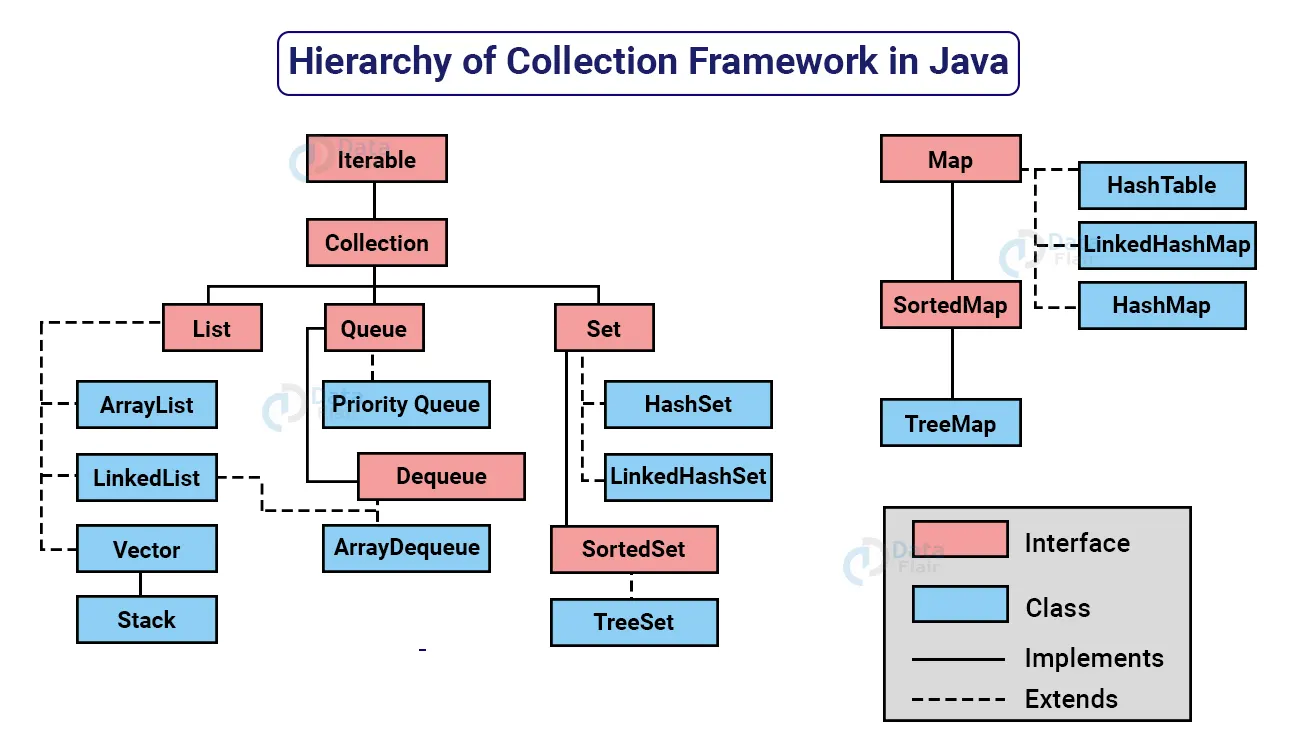
Image Source: DataFlair
When diving into the world of Java programming, one of the essential concepts to grasp is the difference between arrays and collections. Both are crucial for managing data in Java, yet they serve different purposes and come with distinct characteristics. Understanding when to use each can significantly impact the efficiency and clarity of your code. In this comprehensive guide, we’ll explore the nuances between these two data structures, helping you make informed decisions in your Java projects.
Arrays and collections might seem similar at first glance, as both are used to store multiple elements. However, they differ in their implementation and intended use cases. Arrays are fixed in size and often used when the number of elements is known and constant, whereas collections are more flexible, allowing for dynamic resizing and more complex data management tasks. This distinction is critical when designing programs that require adaptability and scalability.
As we journey through this guide, we will delve into the definitions, differences, and practical applications of arrays and collections in Java. By the end, you’ll not only understand their individual characteristics but also when to choose one over the other, ensuring you can harness their full potential in your coding endeavors.
Defining Arrays in Java
Arrays in Java are a fundamental data structure used to store a fixed number of elements of a single type. They are declared with a specific size at the time of creation, and this size cannot be altered during the lifecycle of the array. This immutability in size is both a limitation and an advantage, as it provides predictability and efficient memory management for scenarios where the data size is known beforehand.
The syntax for declaring an array in Java is straightforward. For example, to declare an array of integers with a capacity of ten, you would use:
javaint[] numbers = new int[10];
Here, int[] indicates that the array will contain integers, and [10] specifies the size of the array. All elements in the array are initialized to the default value of the data type, which, for integers, is zero.
Despite their simplicity, arrays offer fast access times for reading and writing elements, thanks to their contiguous memory allocation. However, their fixed size can pose challenges when you need to accommodate a dynamic number of elements. In such cases, collections might offer a more suitable solution.
Defining Collections in Java
Collections in Java, unlike arrays, provide a flexible and dynamic way to handle groups of objects. Java Collections Framework (JCF) encompasses a set of classes and interfaces that manage collections of objects. These collections can grow or shrink in size, making them ideal for scenarios where data size is unpredictable and requires frequent modifications.
Java offers various types of collections, such as Lists, Sets, and Maps, each serving different purposes. Lists, for instance, are ordered collections that allow duplicates, while Sets are unordered and do not permit duplicate elements. Maps, on the other hand, store key-value pairs, offering a convenient way to associate data.
A key advantage of collections is their flexibility. For instance, if you need a resizable array, you might choose an ArrayList, which allows elements to be added or removed at will. This adaptability is achieved through underlying data structures and algorithms that handle resizing and memory allocation, albeit with a slight trade-off in performance compared to arrays.
Key Differences Between Arrays and Collections
Understanding the key differences between arrays and collections is crucial for choosing the appropriate data structure. One of the most significant distinctions is size flexibility. Arrays have a fixed size, determined at creation, while collections can dynamically adjust their size, providing greater flexibility in handling data.
Another important difference lies in the types of elements they can store. Arrays are homogeneous, meaning all elements must be of the same data type. In contrast, collections can be heterogeneous, allowing for a mix of different object types. This feature is particularly useful in cases where a more generic approach to data management is needed.
Performance is also a differentiating factor. Arrays typically offer faster performance for accessing elements due to their contiguous memory allocation, which allows for constant-time complexity operations. Collections, however, may incur additional overhead due to their dynamic nature and underlying data structures. This trade-off needs to be considered when performance is a critical factor.
| Feature | Arrays | Collections |
|---|---|---|
| Size | Fixed | Dynamic |
| Homogeneity | Homogeneous | Heterogeneous |
| Performance | Faster access times | Potential overhead |
| Flexibility | Rigid | Flexible |
When to Use Arrays vs. Collections
Choosing between arrays and collections depends on the specific requirements of your application. Arrays are best suited for scenarios where the number of elements is predetermined and remains constant throughout the program’s execution. They offer efficient memory usage and fast access times, making them ideal for performance-critical applications.
On the other hand, collections are preferable when dealing with dynamic datasets or when the number of elements can vary. Their ability to resize dynamically and manage complex data relationships, like those found in lists or maps, makes them more versatile for applications that require frequent data manipulation.
Consider the following scenarios to help decide:
- Use Arrays When:
- You need optimal performance and the data size is fixed.
- The data is primitive or of the same type.
- Memory efficiency is a priority.
- Use Collections When:
- The data set size is dynamic and needs frequent alteration.
- You require advanced data structures like lists, sets, or maps.
- The application needs to handle various data types.
Performance Comparison: Arrays vs. Collections
Performance is a critical aspect when deciding between arrays and collections. Arrays provide constant-time complexity for accessing elements, making them faster for direct access operations. This speed is due to their contiguous memory allocation, which allows the CPU to fetch data efficiently.
Collections, while offering greater flexibility, may introduce performance overhead. Operations like adding or removing elements can be slower due to the need for resizing and managing pointers. For instance, an ArrayList might need to reallocate its internal array if it reaches its capacity, which can be a costly operation in terms of time and resources.
However, the performance of collections can be optimized by choosing the right type of collection for the task at hand. For example, a LinkedList can offer better performance for frequent insertions and deletions compared to an ArrayList. Understanding these nuances enables developers to tailor their data management approach to the specific needs of their applications.
Common Use Cases for Arrays
Arrays are a staple in Java programming, particularly suited for situations where you need a simple, efficient way to handle a fixed set of data. They are ideal for scenarios where performance is paramount, and the data structure is straightforward, such as:
- Static Data Storage: Use arrays when the number of elements is known in advance and remains unchanged. Examples include storing the months of the year or days of the week.
- Matrix Operations: Arrays are perfect for mathematical computations and matrix operations, where the dimensions are fixed, and fast access to elements is crucial.
- Primitive Data Handling: When dealing with primitive types where memory efficiency is critical, arrays provide a lean and fast option.
Arrays provide a direct way to manage data, making them a reliable choice for applications where simplicity and speed are the primary concerns.
Common Use Cases for Collections
Collections shine in scenarios that demand flexibility and the ability to manage complex data relationships. They are designed to handle more sophisticated data management tasks, such as:
- Dynamic Data Management: When the number of elements is unpredictable, collections can grow and shrink as needed, making them suitable for applications like social media feeds or dynamic user data.
- Data Relationships and Hierarchies: Use collections like
MapsorSetsto manage relationships between objects, such as maintaining a directory of user profiles or handling unique elements. - Complex Data Structures: For applications requiring advanced operations, such as sorting, searching, or filtering, collections provide built-in methods that simplify these tasks.
Collections offer a robust framework for developing applications that require adaptability and sophisticated data handling capabilities.
How to Convert Between Arrays and Collections
In Java, converting between arrays and collections is a common task that can be accomplished seamlessly using built-in methods. This conversion is particularly useful when you need to leverage the strengths of both data structures within the same application.
To convert an array to a collection, you can use the Arrays.asList() method. This method creates a fixed-size List backed by the specified array. For example:
javaString[] array = {"Java", "Python", "C++"};
List<String> list = Arrays.asList(array);
Conversely, to convert a collection to an array, the toArray() method is employed. This method returns an array containing all the elements in the collection. Here’s how you can do it:
javaList<String> list = new ArrayList<>();
list.add("Java");
list.add("Python");
String[] array = list.toArray(new String[0]);
Understanding these conversions allows developers to switch between the predictability of arrays and the flexibility of collections as needed.
Conclusion: Choosing the Right Data Structure for Your Needs
In conclusion, both arrays and collections have their place in Java programming. The choice between the two hinges on the specific needs of your application. Arrays offer speed and predictability for fixed-size data, while collections provide flexibility and advanced data management capabilities.
When embarking on a new project, consider the nature of your data and the operations you’ll perform. For static data with a known size, arrays are a natural fit. If your application requires dynamic data handling or complex structures, collections provide the tools you need.
By understanding the difference between array and collection in Java, you can make informed decisions that enhance the performance and maintainability of your code. Whether you’re optimizing for speed, memory, or flexibility, selecting the right data structure is key to successful Java programming.